Showing posts with label vinyl. Show all posts

7.17.2013

Using Printable HTV (heat transfer vinyl) for dark colors with the Silhouette Cameo

I loooove to make shirts using HTV (heat transfer vinyl) and my favorite brand is Siser Easyweed.  My least favorite is the Silhouette brand...it's awful.  Anyway, as easy as it is to layer Siser Easyweed, sometimes you have projects that just don't work with the limited colors offered, or maybe you want a photo to be ironed on your shirt, or something.  That's where printable HTV comes in.  I have used and liked both Jolee's and Transfermations brands, and been less impressed with the Silhouette brand, though it's not terrible.  As a general rule I like to use the ones made for dark colors even on light colored clothing as it's way more vivid and just looks better in my opinion.

For this shirt I used Transfermations for dark colors.  I either got it at Michael's, Staples, or Walmat, not 100% positive on which.

Normally when you use HTV and even HTV for light colors, you need to mirror the image before you cut.  You do not need to mirror the image with HTV for dark colors.  I'd always read your instructions to be sure but I've used several brands and none require this.

First, get your image all ready in Silhouette Studio.  Get your cut lines situated- if you layered some elements you may need to highlight them and hit "Cut Edge" or whatever works for you.  Do not mirror it!  Turn on registration marks and print it.  I use "Best" settings for quality.  You have to use an Inkjet printer.  If you've found a brand that works with a laser printer, please share!  I've never seen one.

Once it's printed, stick it on your mat and load it into your Cameo.  Have your machine scan the registration marks and get your cut settings ready.

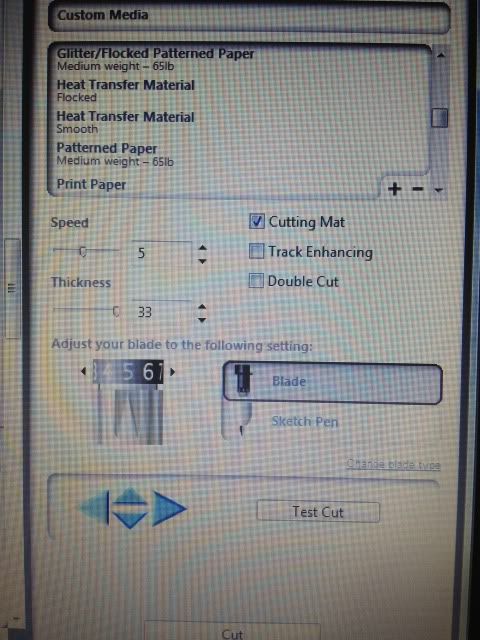
Here's a snap of what settings I use.  I set it to "Flocked HTV" and then change the blade to 5.  That's why it says Custom Media.  ***Note- I get a lot of use out of my blades, but when I switched to a new one, I only had to use HTV Smooth settings, blade on 1!  Big difference!****

Have your machine cut.  You're basically doing Print & Cut, easy, right?  I love Print & Cut and it's the biggest reason I bought my Cameo.

Once your design is cut, you then remove it from it's backing paper.  You'll see that this stuff feels more like Siser Easyweed and not regular printable HTV.

Here's me just peeling up the corner and removing all the excess white- the backing paper does not cut, see it?  I did rip it a little when grabbing that corner but it's almost like the carrier sheet of Siser Easyweed (except not used as such- just that you don't cut that paper, just your HTV.  A kiss cut.  Anyway..)
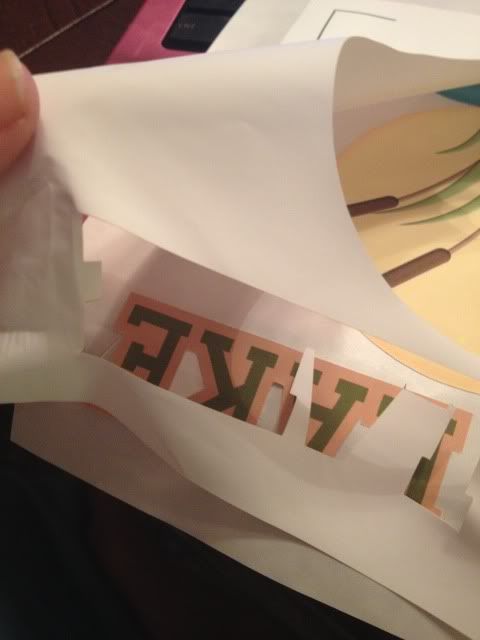

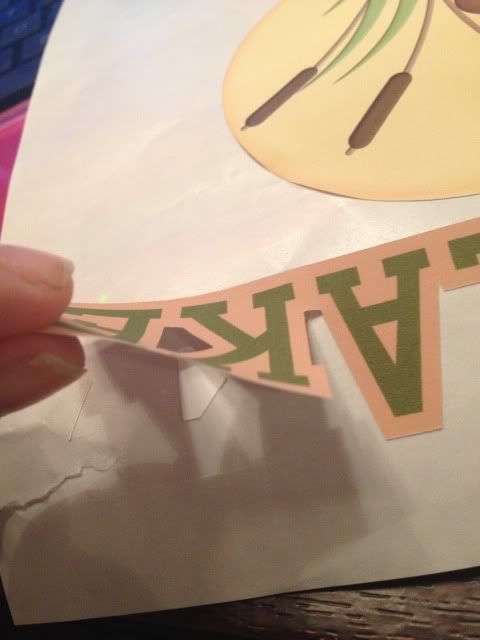
Aaand here's me peeling my design off the backing paper.  This is the one thing I don't like.  Unlike Siser Easyweed which is on a carrier sheet, I have to line up all these elements by hand separately on the t-shirt and yeah, they end up off center sometimes.  I'm working on that.  Practice makes perfect!

See how it weeds itself in between letters and stuff?  It's pretty nifty.
Your next step is to line everything up on your shirt (iron it first, but let it cool before you start re-arranging stuff on it) and when it's to your liking, grab a sheet of parchment paper.  I've always had 1-2 sheets included in whatever pack of dark color printable HTV I buy, and it lasts for several sheets.

Place that over your design- careful, don't jostle anything- and iron.  My iron goes from 1-6 so I set it on 6, no steam, and press really hard for 20 seconds.  Then I pick it up, move it, press again, until I've done the whole design.  The instructions do say not to drag your iron but to pick up and move it.
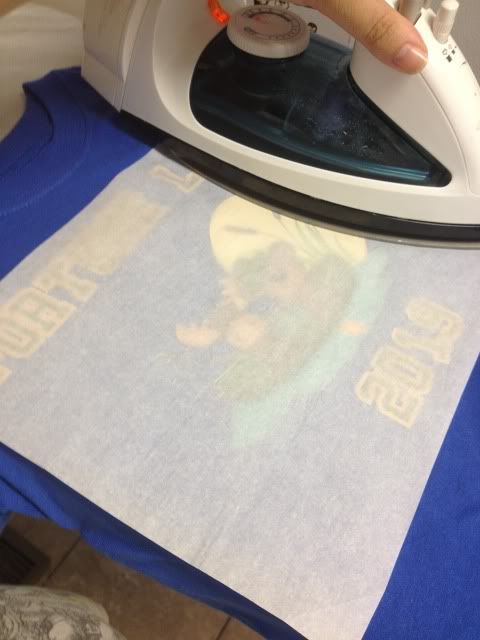


When I'm done I just lift the parchment paper- unlike the Siser Easyweed carrier sheets, it's not going to be sticky to your shirt or anything- and voila, shirt!

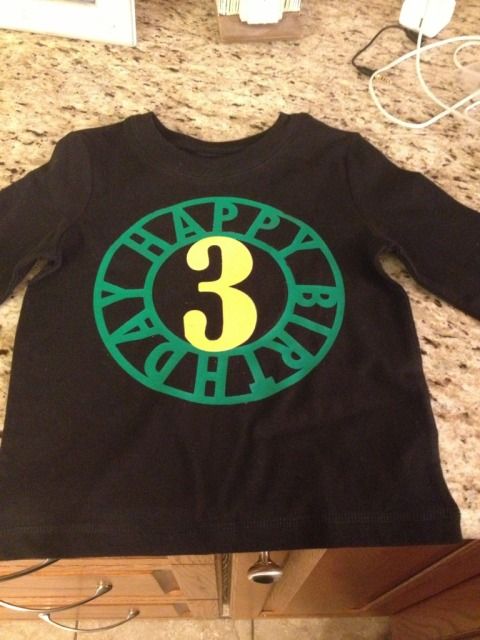
This IS a classic example of me arranging things crooked and/or off center, but on a wiggly 3 year old, it's not very noticeable :) With Siser Easyweed and it's sticky sheets I normally line everything up on the floor and then step back and look at it, and then I can just pick up the shirt and move it to the ironing board, but you can't do that with this stuff- no carrier sheet.  My only pet peeve.

You'll also probably notice that the fishing line is missing some pieces- in removing the design from the backing that part was just too thin and I went too fast, but oh well.  It is what it is.  This is a tiny shirt for a tiny little toddler.
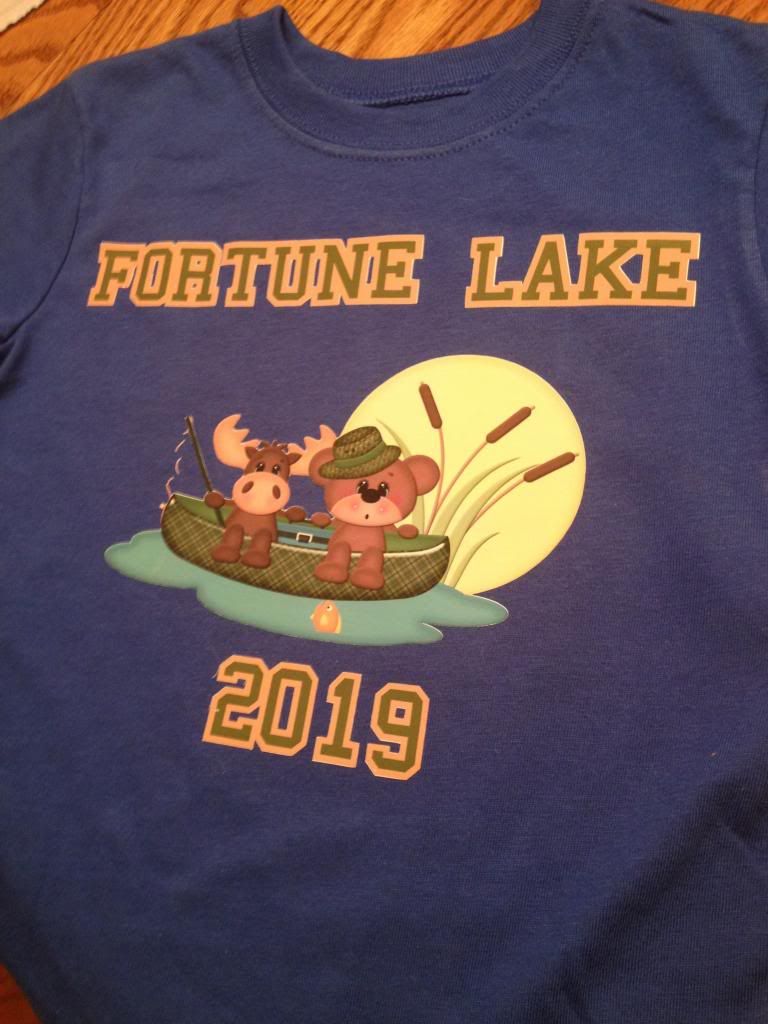

I always wash inside out, and never iron on the design itself, but other than that, I've found this stuff to be very durable!


7.06.2013

Nail Art with Vinyl Stencils

Hi again!  Guess what's back- the nausea!  Fun fun.  In the interest of going back to bed I'm just quickly sharing some photos from almost a month ago.  I wanted to do some fun nail art for our vacation and decided to give my Cameo a 2nd try.  My disastrous first attempt with nail art stencils from the Silhouette store can be found here.

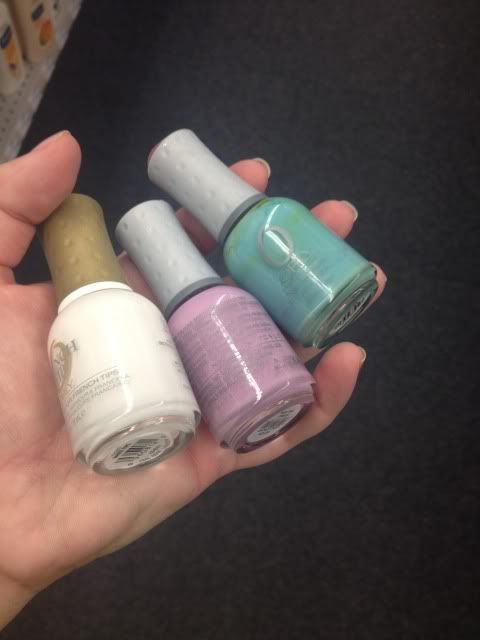
CVS was having a massive sale on Orly when I went in to pick up a prescription so I grabbed these three colors.


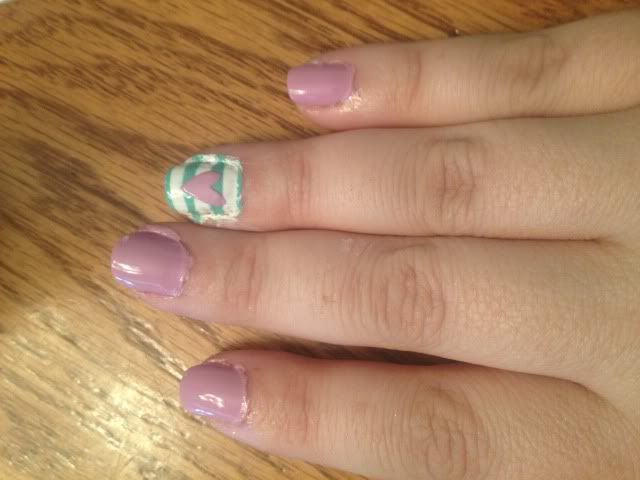
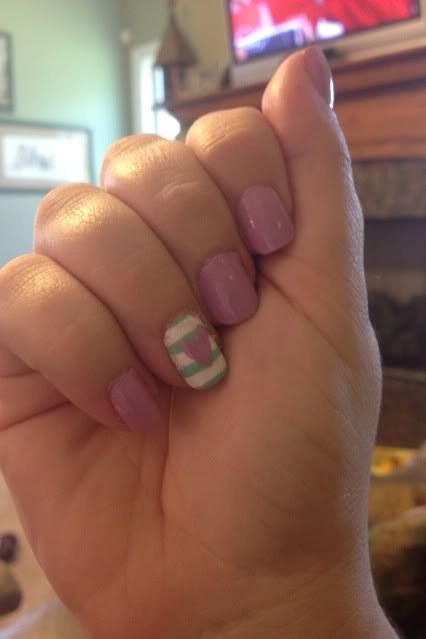
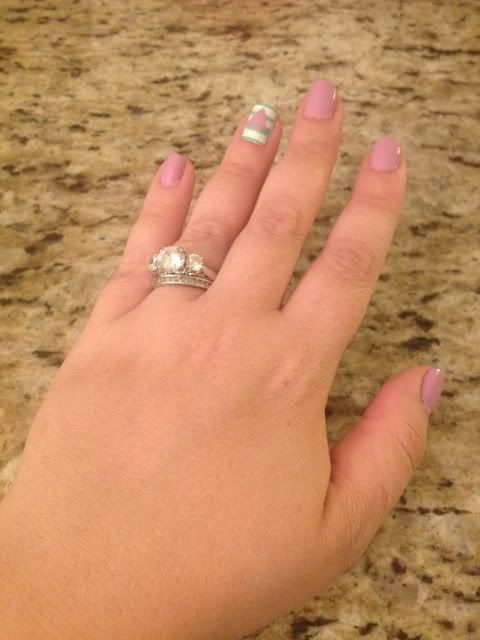
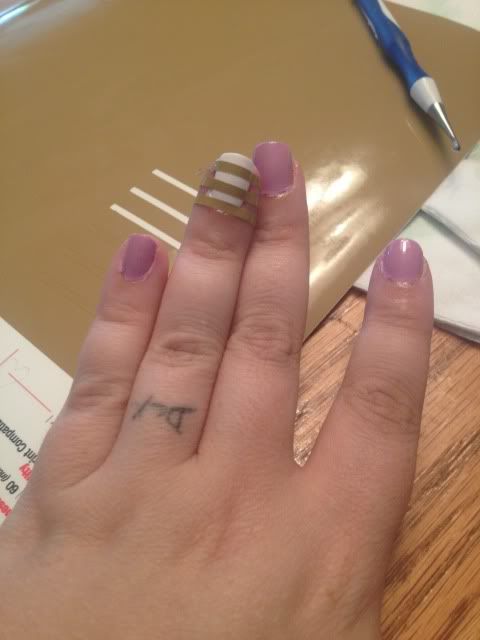
I painted 4 of my nails in the pinky purple and my ring finger in the white on both hands.  I then took some scrap Oracal 631 and cut it into strips.  I tried using scissors and ended up using my cameo to keep the lines straight.  After the white nail was dry (this is great polish for that by the way- I barely needed two coats) I pressed it onto the white nails, keeping it really smooth.


I took the turquoise and brushed it over the vinyl.  I did two light coats quickly, waited about a minute, and peeled off the vinyl.  I think that waiting for the polish to dry will just cause the whole thing to tear off.  I've always heard you should wet peel.  I then put top coat over it (Orly Won't Chip) to smooth it out.


I then took a heart shape I had in my library, shrunk it wayyy down, and cut two out of the same vinyl with my Cameo.  I actually cut this heart in about 4 different tiny sizes since I wasn't really sure what size would fit.  It's kind of hard to measure your own nail!

I did the same as before- apply the vinyl to a completely dry nail, adhere smoothly, 2 quick coats of purple pink polish, wait a minute, and wet peel gently.  Again, top coat goes on top to help smooth it out.


That's pretty much it!  All that's left is clean up.  I do go around the edges with a toothpick or q-tip and polish remover, but most of the mess comes off my skin in the shower so I usually don't sweat it too much.


This polish design lasted soooo long!  All through vacation!  About a week after I first did this I did have to go over all the purple pinky nails with another coat & topcoat but the ring finger nail art stayed for nearly two weeks until I finally removed it all!  It lasted through a Disney vacation which was a plus!

1.05.2013

Vinyl Tumbler Decoration

Yesterday my Cameo went crazy.

It started randomly cutting dots and dashes and despite all my best troubleshooting efforts, it won't stop unless I disconnect it from the computer.  This makes crafting difficult but not impossible.

The Cameo has a "Cut from SD card" feature and I learned how to use it (though I hope I won't have to very often- it's a longer process).

First, you have to save every part of your design to the card separately unless you want more than one piece in the same color/material (in my case, anything orange was one file, turquoise another, & white was a third file).  Just put what you want on your virtual mat and hit "Save to SD card."  Name it something obvious so you can find it.

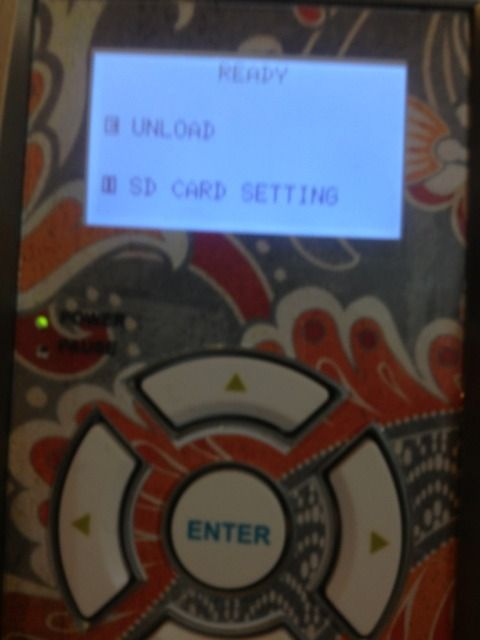
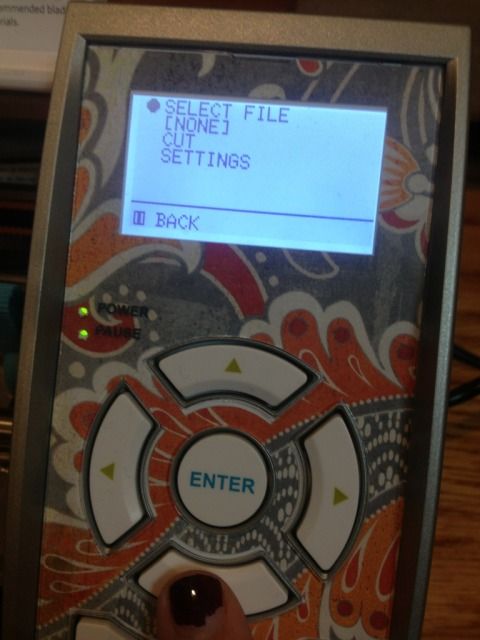
Now, go ahead and put your first material on your mat and load it.  Then pop in the SD card.  You'll see that you have to hit "Pause" for the SD card settings.


 Go to "Select File" and hit enter (eek, ignore my nail polish!!!)


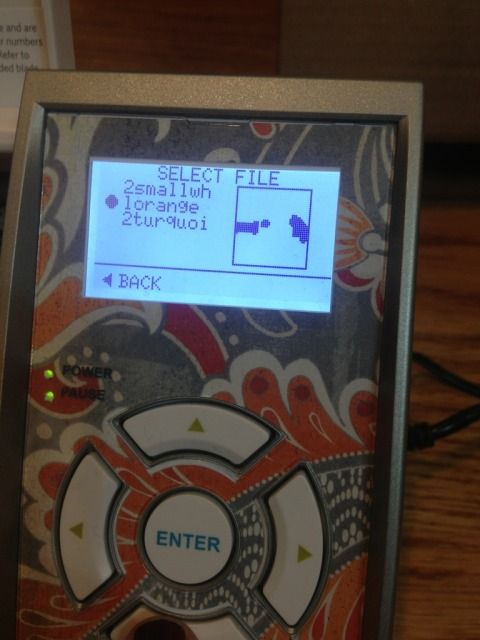
Scroll down until you see what you want to cut and hit "Enter" again.  The photo is NOT the image...at all.  This particular file was the small orange border piece in the middle of the turquoise part.


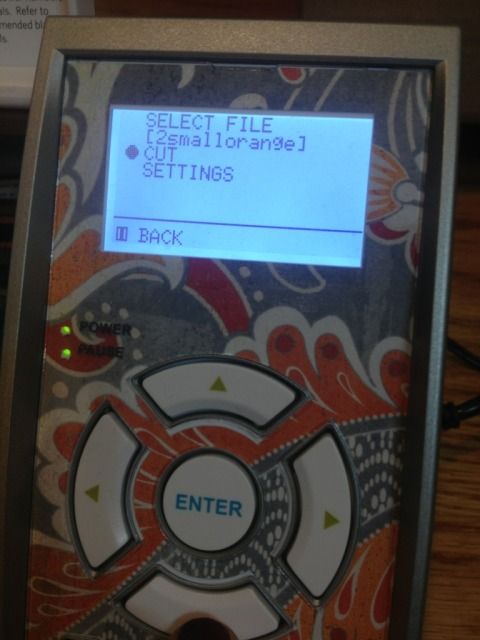
Now you'll see your file name where it previously said NONE.  Scroll down to Cut and hit "Enter."


And it will cut!  Then you will just find your other files one by one as you reload your mat.

Tedious, but it works in a pinch.

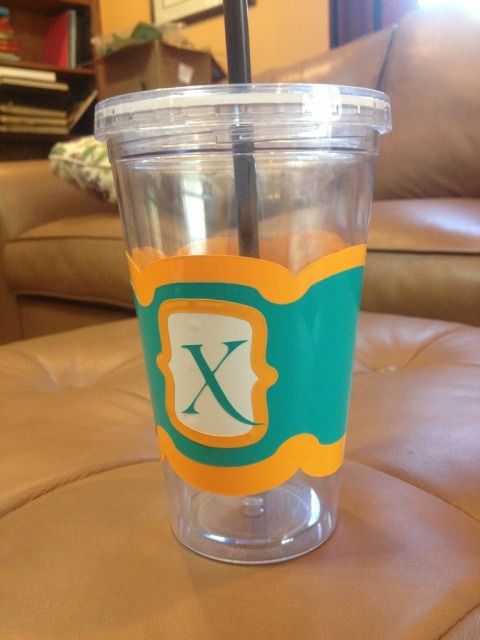
I'll be changing the X.  The flourish looked better on screen.

This file is actually a coffee cup wrap and can be found in the Silhouette online store


1.03.2013

3rd Birthday T-shirt

Someone is turning THREE years old over here! Where did the time go???!!!

I wanted to make him a t-shirt to wear to preschool on his birthday. I already had a black t-shirt and bought some Jolee's heat transfer paper for colored fabrics. I then wasted 2 sheets of it as my Cameo would not cut the design properly.

 I switched to some flat (regular) and flocked (thicker and kind of fuzzy). A lot of people don't like the flat HTV that Silhouette makes. I can see why. It cut ragged and it stretched when weeding, meaning again I trashed the cut.

However, the flocked HTV cut great!

 I had some Siser Easyweed left over from a shirt I made for my husband. It wasn't a color that I wanted to use but it was all I had left. I did end up liking the final product.

The green is Siser Easyweed and the yellow is the flocked Silhouette HTV.


I tried to take a photo of the flocked vs flat as well
Uploaded from the Photobucket iPhone App

I have a few other crafts to post, a lot to do, and even a bunch of stuff for What I Wore Wednesday- shocking, I know!

Thanks for reading, as always!

12.17.2012

Vinyl on $1 Chargers

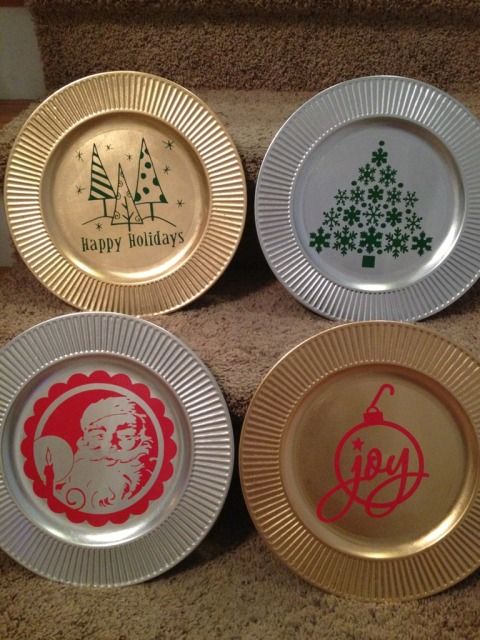
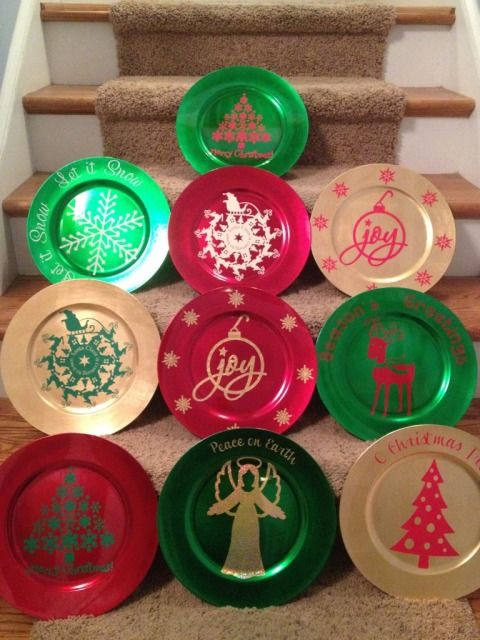
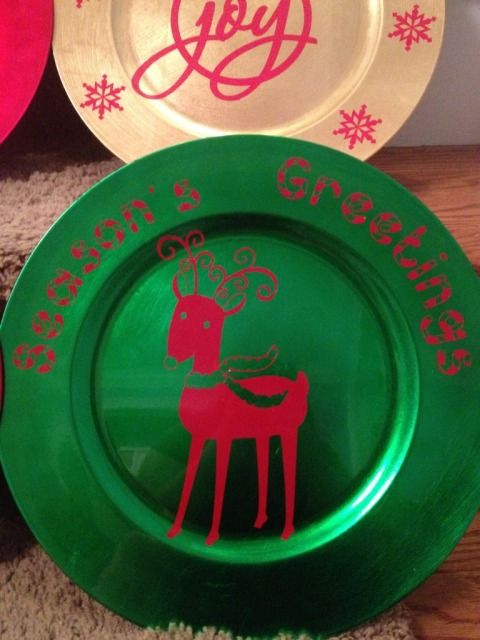
The title really says it all.  A sheet of vinyl, 12 x 24", is about $1.96 and many online vinyl stores have coupons out there.  The chargers were $1 at Dollar Tree.  While some people have had no problems putting vinyl in the dishwasher, you may not be as lucky, so be careful.  These chargers are great for place setting or giving gifts like Christmas cookies.


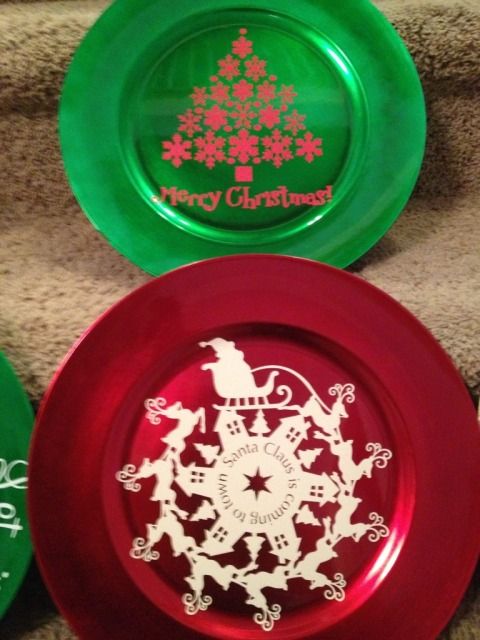
Cute huh?  Some detail:


Isn't that deer just adorable?  These really jazz up a typical paper plate of cookies, or even better, it's a dish you don't have to worry about getting back!


11.07.2012

Utensil Holders

***First- if you want to win a marker holder for your Silhouette Cameo completely FREE, go here!***

My friend gave me this awesome idea for a craft fair I am doing this weekend.  I agreed 7 days before the show to participate with NOTHING made...EEK!  It has been a busy week and it's only Wednesday!

Yesterday during my son's nap I made 4 of these (2 of each color).  They are kiddie plastic utensil holders from Dollar Tree.  Each has 2 little forks and 2 little knives.  They are cute!  My son is mad that I wouldn't give him one so I guess later I'll be stopping by the store to make a special one just for him.

Princess image & crown are from the Silhouette Store.  The star, the "rockstar" font, and the music notes are traced from Google Images.


Not bad for a $1 item with with less than 1/12th of a sheet of vinyl used!

10.27.2012

Layered Vinyl Elmo Tumbler

***The giveaway for a FREE Chomas Creations Marker Holder for the Silhouette Cameo is coming soon!  Open to blog followers only and you can earn up to 4 entries per person. Follow my blog if you aren't already and stay tuned!***

My poor little guy isn't feeling well and doesn't want any fluids, so I left him in front of Mickey Mouse Clubhouse (my crafty room actually has no doors, just 2 arches, and it's about 10 steps away from the living room, so it's easy to keep an eye on him and craft) and set off to make a bribe with another Dollar Tree tumbler (my first one with a wrap template found here).

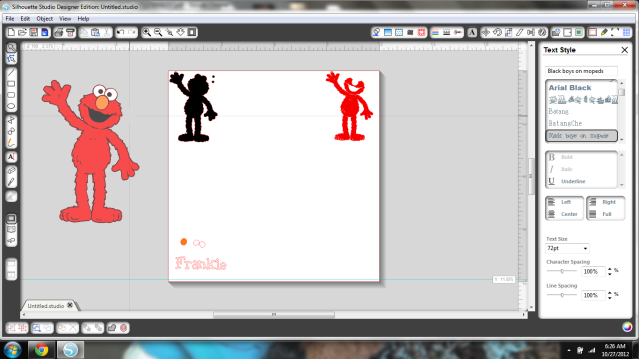
This time I decided to layer an image itself and picked Elmo because until my two vinyl orders arrive I'm pretty low on inventory.  I also wanted to do this fast so I separated black, red, and white on the mat and then Frankenstein-layered the colors of vinyl on the mat as well.


While the Cameo does do Print & Cut, and I do have printable vinyl, this is just red, black, and white vinyl.  Only the edges of the shapes cut.  I just kept them shaded since it was easier to see.

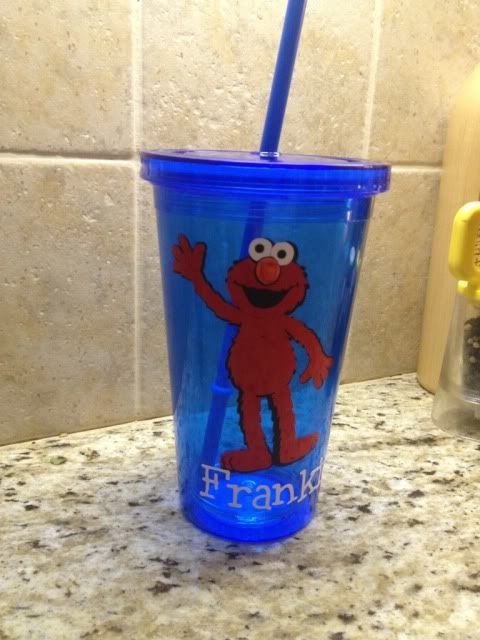
Here's a fairly dark photo of the final layered result.  Incidentally, it's gloomy all over today because of Sandy; anyone else in her path?  I have a wedding to go to tonight too!  Fingers crossed for no power outage!


If you're looking at this and realizing that I had no orange vinyl, you're right, I didn't.  Elmo has an orange nose thanks to an orange Sharpie marker.  

Mission accomplished, sicky toddler boy is drinking water and I got some crafty time before Frankenstorm Sandy really gets going and shuts off the electricity!  Stay safe everyone!


Showing posts with label vinyl. Show all posts

7.17.2013

Using Printable HTV (heat transfer vinyl) for dark colors with the Silhouette Cameo

I loooove to make shirts using HTV (heat transfer vinyl) and my favorite brand is Siser Easyweed.  My least favorite is the Silhouette brand...it's awful.  Anyway, as easy as it is to layer Siser Easyweed, sometimes you have projects that just don't work with the limited colors offered, or maybe you want a photo to be ironed on your shirt, or something.  That's where printable HTV comes in.  I have used and liked both Jolee's and Transfermations brands, and been less impressed with the Silhouette brand, though it's not terrible.  As a general rule I like to use the ones made for dark colors even on light colored clothing as it's way more vivid and just looks better in my opinion.

For this shirt I used Transfermations for dark colors.  I either got it at Michael's, Staples, or Walmat, not 100% positive on which.

Normally when you use HTV and even HTV for light colors, you need to mirror the image before you cut.  You do not need to mirror the image with HTV for dark colors.  I'd always read your instructions to be sure but I've used several brands and none require this.

First, get your image all ready in Silhouette Studio.  Get your cut lines situated- if you layered some elements you may need to highlight them and hit "Cut Edge" or whatever works for you.  Do not mirror it!  Turn on registration marks and print it.  I use "Best" settings for quality.  You have to use an Inkjet printer.  If you've found a brand that works with a laser printer, please share!  I've never seen one.

Once it's printed, stick it on your mat and load it into your Cameo.  Have your machine scan the registration marks and get your cut settings ready.

Here's a snap of what settings I use.  I set it to "Flocked HTV" and then change the blade to 5.  That's why it says Custom Media.  ***Note- I get a lot of use out of my blades, but when I switched to a new one, I only had to use HTV Smooth settings, blade on 1!  Big difference!****


Have your machine cut.  You're basically doing Print & Cut, easy, right?  I love Print & Cut and it's the biggest reason I bought my Cameo.

Once your design is cut, you then remove it from it's backing paper.  You'll see that this stuff feels more like Siser Easyweed and not regular printable HTV.

Here's me just peeling up the corner and removing all the excess white- the backing paper does not cut, see it?  I did rip it a little when grabbing that corner but it's almost like the carrier sheet of Siser Easyweed (except not used as such- just that you don't cut that paper, just your HTV.  A kiss cut.  Anyway..)


Aaand here's me peeling my design off the backing paper.  This is the one thing I don't like.  Unlike Siser Easyweed which is on a carrier sheet, I have to line up all these elements by hand separately on the t-shirt and yeah, they end up off center sometimes.  I'm working on that.  Practice makes perfect!

See how it weeds itself in between letters and stuff?  It's pretty nifty.

Your next step is to line everything up on your shirt (iron it first, but let it cool before you start re-arranging stuff on it) and when it's to your liking, grab a sheet of parchment paper.  I've always had 1-2 sheets included in whatever pack of dark color printable HTV I buy, and it lasts for several sheets.

Place that over your design- careful, don't jostle anything- and iron.  My iron goes from 1-6 so I set it on 6, no steam, and press really hard for 20 seconds.  Then I pick it up, move it, press again, until I've done the whole design.  The instructions do say not to drag your iron but to pick up and move it.


When I'm done I just lift the parchment paper- unlike the Siser Easyweed carrier sheets, it's not going to be sticky to your shirt or anything- and voila, shirt!

This IS a classic example of me arranging things crooked and/or off center, but on a wiggly 3 year old, it's not very noticeable :) With Siser Easyweed and it's sticky sheets I normally line everything up on the floor and then step back and look at it, and then I can just pick up the shirt and move it to the ironing board, but you can't do that with this stuff- no carrier sheet.  My only pet peeve.

You'll also probably notice that the fishing line is missing some pieces- in removing the design from the backing that part was just too thin and I went too fast, but oh well.  It is what it is.  This is a tiny shirt for a tiny little toddler.


I always wash inside out, and never iron on the design itself, but other than that, I've found this stuff to be very durable!


7.06.2013

Nail Art with Vinyl Stencils

Hi again!  Guess what's back- the nausea!  Fun fun.  In the interest of going back to bed I'm just quickly sharing some photos from almost a month ago.  I wanted to do some fun nail art for our vacation and decided to give my Cameo a 2nd try.  My disastrous first attempt with nail art stencils from the Silhouette store can be found here.

CVS was having a massive sale on Orly when I went in to pick up a prescription so I grabbed these three colors.


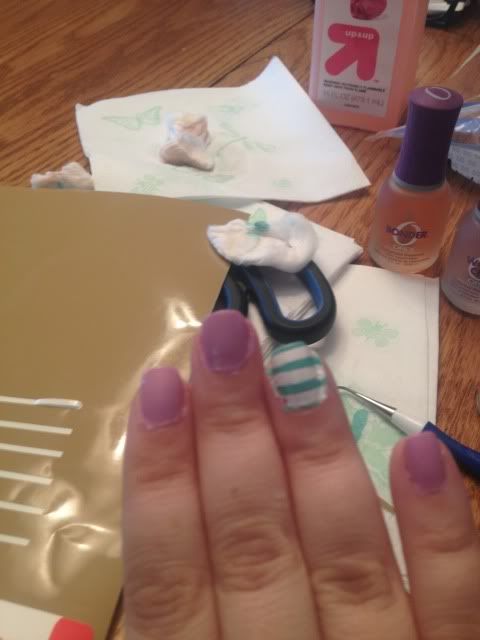
I painted 4 of my nails in the pinky purple and my ring finger in the white on both hands.  I then took some scrap Oracal 631 and cut it into strips.  I tried using scissors and ended up using my cameo to keep the lines straight.  After the white nail was dry (this is great polish for that by the way- I barely needed two coats) I pressed it onto the white nails, keeping it really smooth.


I took the turquoise and brushed it over the vinyl.  I did two light coats quickly, waited about a minute, and peeled off the vinyl.  I think that waiting for the polish to dry will just cause the whole thing to tear off.  I've always heard you should wet peel.  I then put top coat over it (Orly Won't Chip) to smooth it out.


I then took a heart shape I had in my library, shrunk it wayyy down, and cut two out of the same vinyl with my Cameo.  I actually cut this heart in about 4 different tiny sizes since I wasn't really sure what size would fit.  It's kind of hard to measure your own nail!

I did the same as before- apply the vinyl to a completely dry nail, adhere smoothly, 2 quick coats of purple pink polish, wait a minute, and wet peel gently.  Again, top coat goes on top to help smooth it out.


That's pretty much it!  All that's left is clean up.  I do go around the edges with a toothpick or q-tip and polish remover, but most of the mess comes off my skin in the shower so I usually don't sweat it too much.


This polish design lasted soooo long!  All through vacation!  About a week after I first did this I did have to go over all the purple pinky nails with another coat & topcoat but the ring finger nail art stayed for nearly two weeks until I finally removed it all!  It lasted through a Disney vacation which was a plus!

1.05.2013

Vinyl Tumbler Decoration

Yesterday my Cameo went crazy.

It started randomly cutting dots and dashes and despite all my best troubleshooting efforts, it won't stop unless I disconnect it from the computer.  This makes crafting difficult but not impossible.

The Cameo has a "Cut from SD card" feature and I learned how to use it (though I hope I won't have to very often- it's a longer process).

First, you have to save every part of your design to the card separately unless you want more than one piece in the same color/material (in my case, anything orange was one file, turquoise another, & white was a third file).  Just put what you want on your virtual mat and hit "Save to SD card."  Name it something obvious so you can find it.

Now, go ahead and put your first material on your mat and load it.  Then pop in the SD card.  You'll see that you have to hit "Pause" for the SD card settings.


 Go to "Select File" and hit enter (eek, ignore my nail polish!!!)


Scroll down until you see what you want to cut and hit "Enter" again.  The photo is NOT the image...at all.  This particular file was the small orange border piece in the middle of the turquoise part.


Now you'll see your file name where it previously said NONE.  Scroll down to Cut and hit "Enter."


And it will cut!  Then you will just find your other files one by one as you reload your mat.

Tedious, but it works in a pinch.

I'll be changing the X.  The flourish looked better on screen.

This file is actually a coffee cup wrap and can be found in the Silhouette online store


1.03.2013

3rd Birthday T-shirt

Someone is turning THREE years old over here! Where did the time go???!!!

I wanted to make him a t-shirt to wear to preschool on his birthday. I already had a black t-shirt and bought some Jolee's heat transfer paper for colored fabrics. I then wasted 2 sheets of it as my Cameo would not cut the design properly.

 I switched to some flat (regular) and flocked (thicker and kind of fuzzy). A lot of people don't like the flat HTV that Silhouette makes. I can see why. It cut ragged and it stretched when weeding, meaning again I trashed the cut.

However, the flocked HTV cut great!

 I had some Siser Easyweed left over from a shirt I made for my husband. It wasn't a color that I wanted to use but it was all I had left. I did end up liking the final product.

The green is Siser Easyweed and the yellow is the flocked Silhouette HTV.


I tried to take a photo of the flocked vs flat as well
Uploaded from the Photobucket iPhone App

I have a few other crafts to post, a lot to do, and even a bunch of stuff for What I Wore Wednesday- shocking, I know!

Thanks for reading, as always!

12.17.2012

Vinyl on $1 Chargers

The title really says it all.  A sheet of vinyl, 12 x 24", is about $1.96 and many online vinyl stores have coupons out there.  The chargers were $1 at Dollar Tree.  While some people have had no problems putting vinyl in the dishwasher, you may not be as lucky, so be careful.  These chargers are great for place setting or giving gifts like Christmas cookies.


Cute huh?  Some detail:


Isn't that deer just adorable?  These really jazz up a typical paper plate of cookies, or even better, it's a dish you don't have to worry about getting back!


11.07.2012

Utensil Holders

***First- if you want to win a marker holder for your Silhouette Cameo completely FREE, go here!***

My friend gave me this awesome idea for a craft fair I am doing this weekend.  I agreed 7 days before the show to participate with NOTHING made...EEK!  It has been a busy week and it's only Wednesday!

Yesterday during my son's nap I made 4 of these (2 of each color).  They are kiddie plastic utensil holders from Dollar Tree.  Each has 2 little forks and 2 little knives.  They are cute!  My son is mad that I wouldn't give him one so I guess later I'll be stopping by the store to make a special one just for him.

Princess image & crown are from the Silhouette Store.  The star, the "rockstar" font, and the music notes are traced from Google Images.


Not bad for a $1 item with with less than 1/12th of a sheet of vinyl used!

10.27.2012

Layered Vinyl Elmo Tumbler

***The giveaway for a FREE Chomas Creations Marker Holder for the Silhouette Cameo is coming soon!  Open to blog followers only and you can earn up to 4 entries per person. Follow my blog if you aren't already and stay tuned!***

My poor little guy isn't feeling well and doesn't want any fluids, so I left him in front of Mickey Mouse Clubhouse (my crafty room actually has no doors, just 2 arches, and it's about 10 steps away from the living room, so it's easy to keep an eye on him and craft) and set off to make a bribe with another Dollar Tree tumbler (my first one with a wrap template found here).

This time I decided to layer an image itself and picked Elmo because until my two vinyl orders arrive I'm pretty low on inventory.  I also wanted to do this fast so I separated black, red, and white on the mat and then Frankenstein-layered the colors of vinyl on the mat as well.


While the Cameo does do Print & Cut, and I do have printable vinyl, this is just red, black, and white vinyl.  Only the edges of the shapes cut.  I just kept them shaded since it was easier to see.

Here's a fairly dark photo of the final layered result.  Incidentally, it's gloomy all over today because of Sandy; anyone else in her path?  I have a wedding to go to tonight too!  Fingers crossed for no power outage!


If you're looking at this and realizing that I had no orange vinyl, you're right, I didn't.  Elmo has an orange nose thanks to an orange Sharpie marker.  

Mission accomplished, sicky toddler boy is drinking water and I got some crafty time before Frankenstorm Sandy really gets going and shuts off the electricity!  Stay safe everyone!