Showing posts with label print and cut. Show all posts

8.22.2013

Cards with print and cut, mod podge, embossing, and more!

I've been having a little fun doing something I don't normally do, which is make cards.  Normally I feel like cards are kind of a waste of paper.  People rarely save them and paper = trees, ya know?

Regardless, I did want to make a few cards recently, and here are the results.

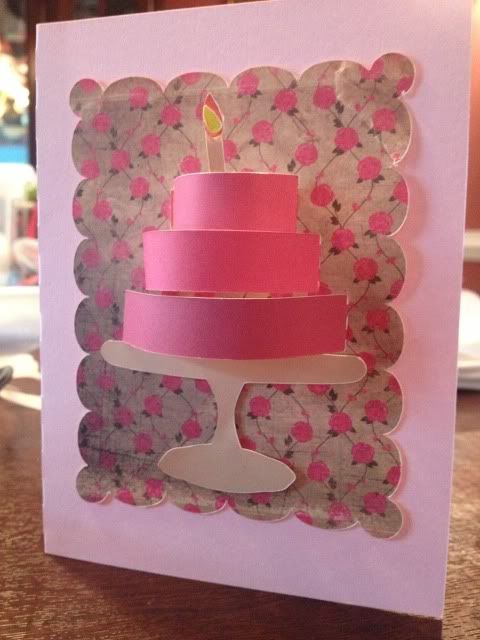
The first one was for my mother in law's birthday.  This card was made with print and cut, my favorite feature of the Silhouette Cameo.  The card itself is pale pink cardstock but everything else is print and cut.  I filled the background shape with the pretty rose pattern, use the color matching dropper tool to pick out pinks from the roses and make a gradient of colors for the cake, and filled in the cake stand and candle parts with solid colors.  Print, cut, glue, voila!


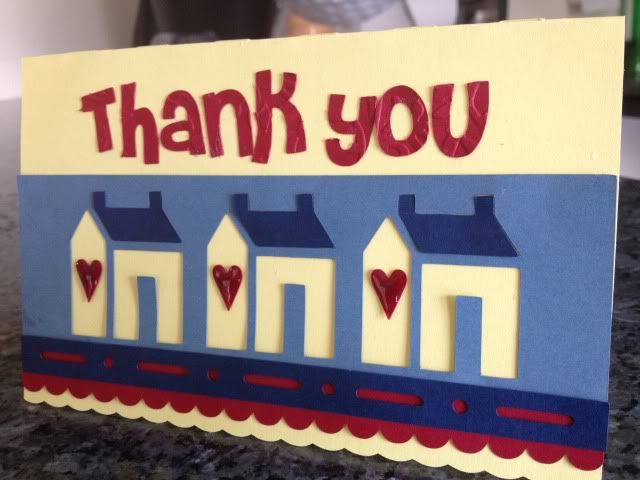
The second card I made is for our awesome, patient, and hard working Realtor.  This card is actually a "Welcome to the Neighborhood" card in the Silhouette store but I just deleted the text and added "Thank you" instead (Font name- Cheri).


Before cutting the letters I ran the paper through my Sizzix Big Shot using a Cuttlebug embossing folder.  I had to bump my blade up from 3 to 5 to cut through the cardstock after that, but I like the delicate detail it gives.

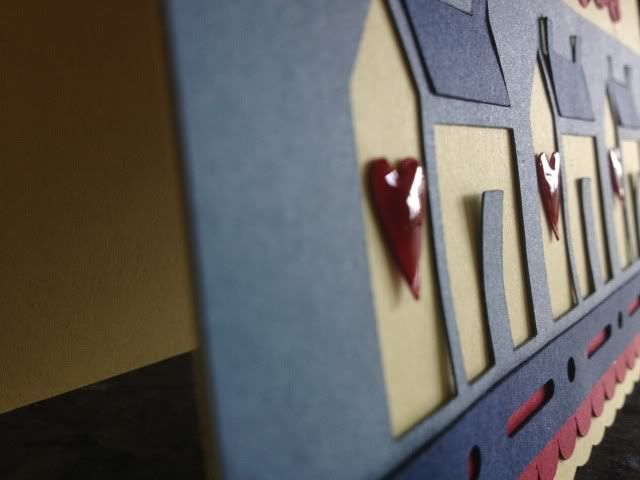
Everything on this card is colored card stock, no print and cut this time!  The hearts have Mod Podge Dimensional Magic  on them which is really fun as it dries clear but hard, smooth, shiny, and raised up.


I'm considering making our holiday cards this year instead of ordering the ever-present Shutterfly photo card, but we'll see if I have the patience for that (especially with a newborn coming soon!).

5.03.2013

Baby banner, and shape cropping with the Silhouette Cameo

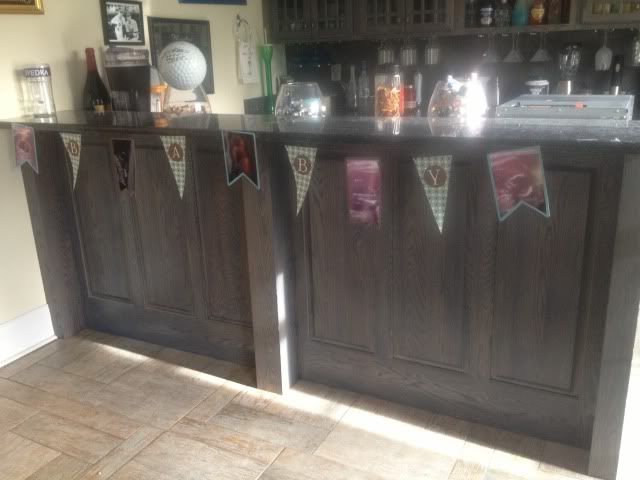
I was reading the Silhouette blog for the first time in awhile and noticed that today's posting involved a shape challenge.  You can see it here, along with a link to the shape's download page.  Since I have been trying to make some baby shower decor (so far my tissue balls are more like tissue wheels...) I decided to use this as an opportunity to make a banner to string across the 8' long dessert table at the baby shower.

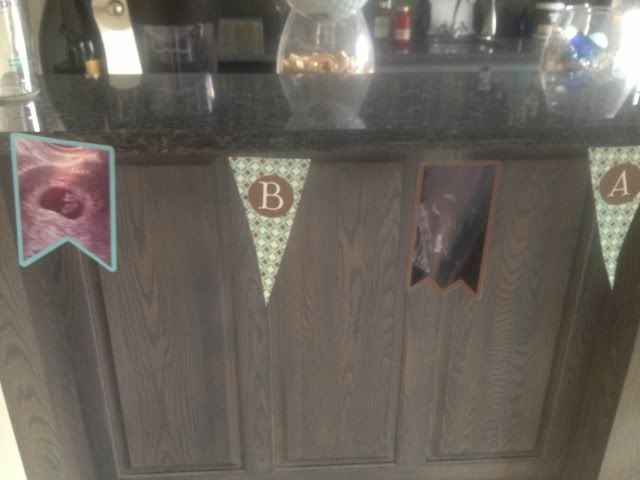
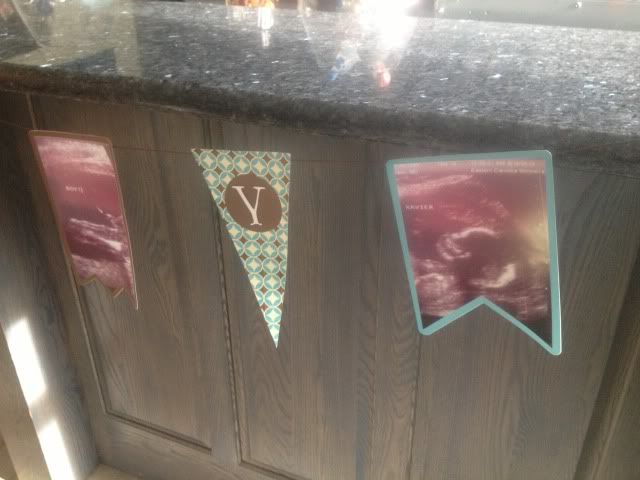
I think it's pretty obvious that my favorite feature of the Silhouette software is print & cut, since I don't need to have anything on hand but plain white card stock.  I bought the blue & brown pattern in the Silhouette store and filled up the shape's triangle banners.  I then created a circle inside the triangle, turned off the cut lines, and color matched it.  I then used print & cut to make 4 of those.  The letters BABY were cut out of white card stock and adhered with rolled glue dots to give them a little dimension.

Next came my ultrasound photos.  I used the other two shapes from the banner and shape cropped my ultrasound photos.  This is really easy to do.


First lay your photo and then choose the shape you want it.  Drag that shape over to the photo and align it where you want the crop.  It might be hard to see, but that banner shape is over the baby in the ultrasound in the screenshot below.


Next, drag your mouse and highlight/select both the photo and the shape at the same time.

Last, click Modify (top right, looks like a rectangle with a circled M in the upper right corner- see pic below) and then click crop.  Voila!  Easy peasy!  You may have to manually turn the cut lines on the shape when you crop it this way so just go to your cut line window (scissors with red, to the left of the font's A symbol) and click "Cut Edge."


I then created offsets for all 5 of my ultrasound photos and fill color matched them blue and brown to the triangle's pattern (you can see the blue offset for this particular ultrasound in the screenshots above).

Lots of printing & cutting comes next- I love print and cut, have I said that?  All I needed to have on hand for this was 12 sheets of plain white card stock and some string.

I used glue dots on the corners of the ultrasound photos and stuck them to the offsets.  I then used my bar, which is 8' 5" long, marked off 8' exactly, and measured out the string, taping the ends to the bar.  Starting with the center ultrasound photo and working out, I taped the string about 1/2 inch down the back of each banner piece.  For the party, this will be strung across the dessert table, with a white tablecloth behind it and white and blue tissue balls at each end (if I can get that particular craft mastered!).


So cute!  I love personalized decor and thought this was much more fun than a cluster of framed ultrasound photos. 

If you don't like to print, cut, and glue x1000, just make every single banner piece one layer- IE, shape crop your ultrasound, turn off the cut lines, offset it, color it, turn those cut lines on, and print & cut it.  That should print you a photo with a border, basically (the offset) and then cut it.  Ditto on the letters- just turn off the cut lines and group them in the circle of the pennant and print & cut it into one piece.

Thanks for looking!


4.24.2013

Happy spring & a tire swing

I have barely looked at my Cameo since I found out I was pregnant in January.  I've played with the software, dreamed of what I'm going to make for the holidays in our new house, thought about what I can make for the new baby to wear, etc...very little actual crafting however.  That will probably change for my baby shower next month, but for now, I just made this cute little card.

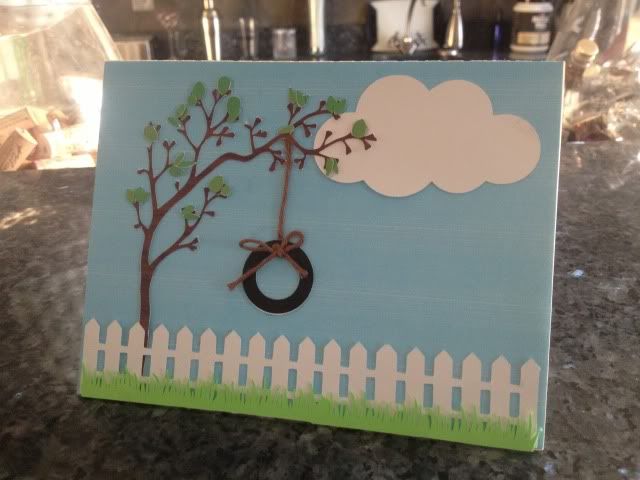
Every shape is in the Silhouette store and the only colored paper I used was the green grass; the rest is all print & cut, even the background.  I needed a birthday card for someone and liked the idea of a white picket fence, but not a house since it wasn't for a housewarming.  I had the string laying around and even though I cut cardstock "rope" I changed my mind and I like the string much better :)

This is my favorite part of owning a Cameo over a Cricut (which I still have..)- I can browse the online store, buy a single shape that I like, mix & match all of my shapes, resize, color, edit, and make a digital template, then print it, cut it, and put it together, without getting up or going to the store!


Shape links:

The card itself is this card's shape minus all embellishments, and then I just made a square the same size as the front half and print & cut it blue

I placed the leaves one by one by first putting small glue dots all over where I wanted the leaves, and then using the Pick Me Up tool, placed them one by one easily & quickly over the glue dots.

The birthday girl liked it so much that she wants me to make her 24 random cards, blank inside, and pay me of course :) Guess I'll be busy on the Cameo after all!

1.21.2013

Happy 3rd Birthday to Vivi!

My good friend Val has a little girl who was born right around Frankie's original due date.  Vivi is the cutest thing ever and when Val asked me to make her some birthday gear I jumped at the chance to play with pink for a change!

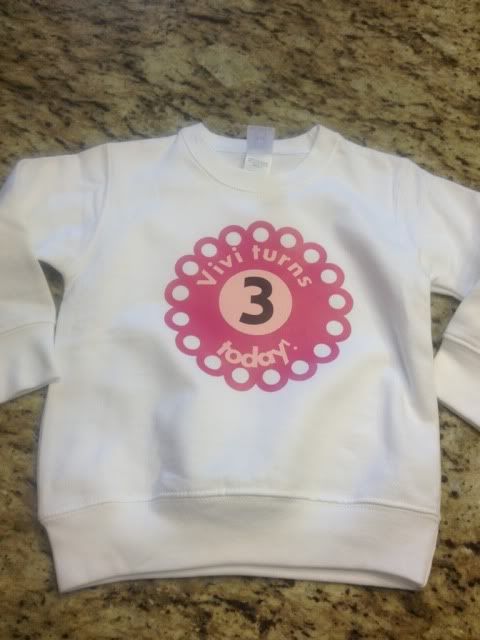
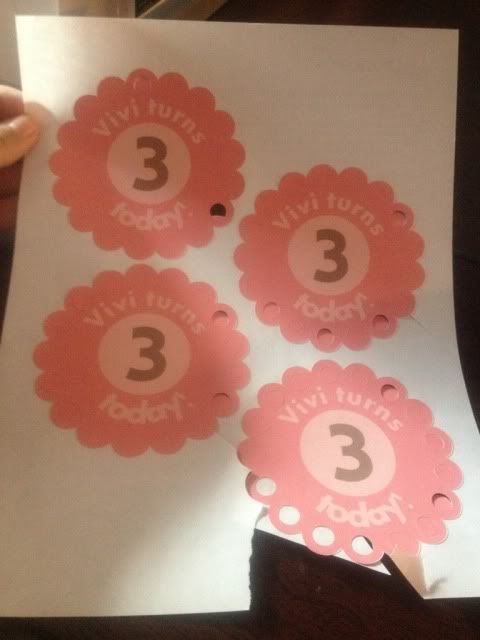
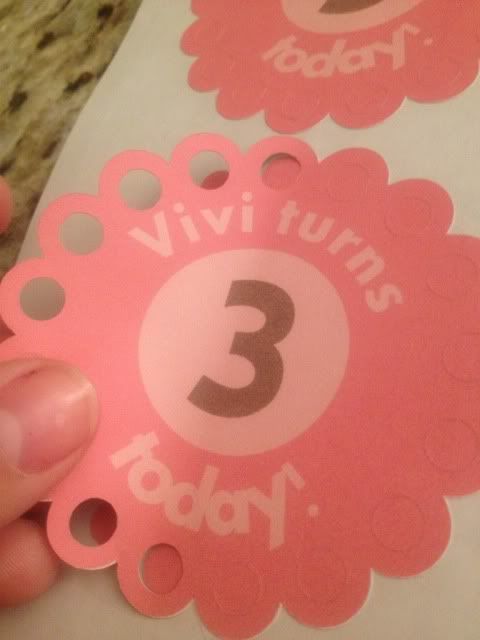
Val had already found a picture that she liked, and using some scalloped circle shapes from the Silhouette Store we put this little design together.  Val tweaked it a bit, most noticeably adding the second circle around the "3," and then asked for matching stickers.  Those were really easy as long as I made sure that the only cut lines set were those of the scalloped circle and nothing inside!

Front of shirt

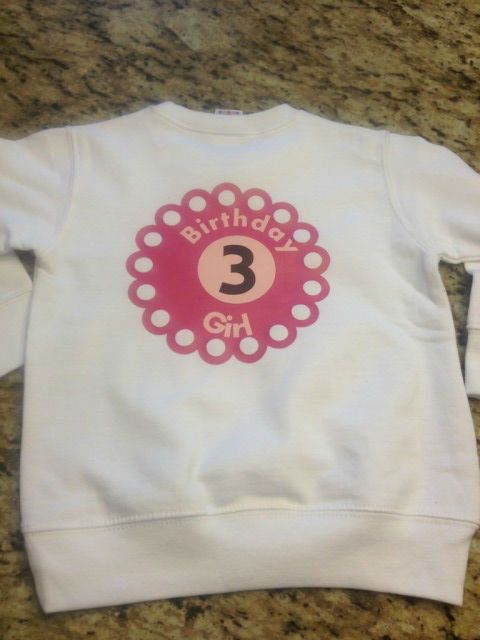
Val wanted a similar design on the back:

I don't know why it looks so oddly off center.  Bump in the shirt maybe?  I swear it's straight!:p

She also asked for matching stickers.  She is going to put them on party hats- how cute is that???  And some extra for people to wear like a normal sticker.  I even sent her some extra large stickers for decorating.  If I had a girl I would stick them on a vase, fill the vase with candy, and some pink flowers...ok, enough dreaming of pink!

I ran into two issues during stickers, and I fixed them both, which is why I'm sharing.

First issue- sticker paper settings on the Cameo are too rough.  So are vinyl settings.  I did not want the blade to cut through the backing paper.  I wanted a kiss cut, which is where the sticker is cut but the backing is intact, like a sheet of stickers.


I finally fixed this problem using the settings:  Blade: 1, Speed: 6, Thickness: 8.


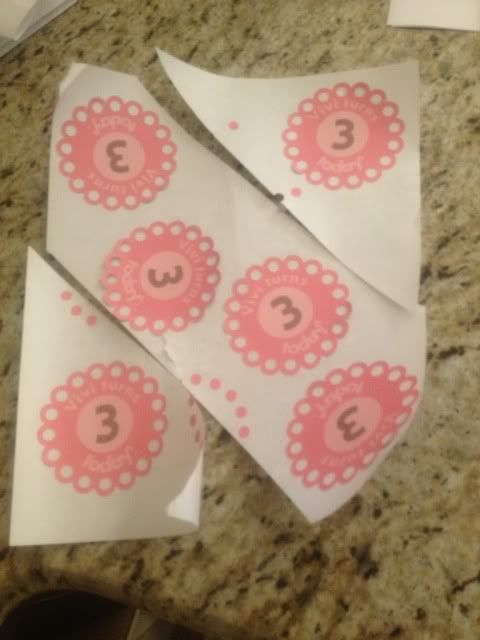
I was so happy to see that fixed, but I then realized that this sticker paper was split in two places down the back, I'm assuming to make it easier to remove stickers?  Well, these stickers were getting mailed to Disney World, not used right away.

Stickers that I repositioned to be around the splits in the backing paper...


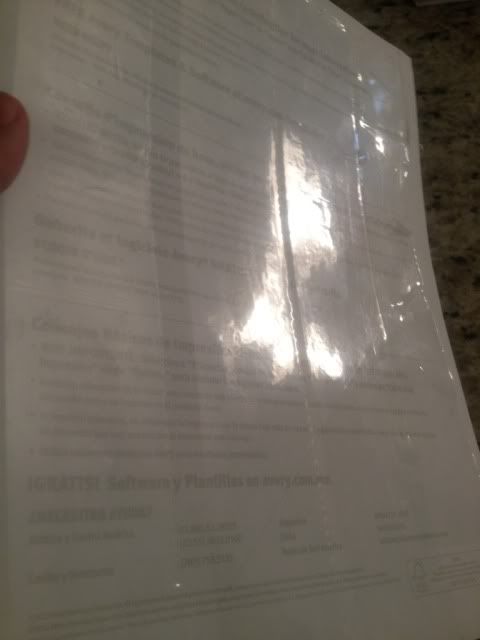
My fix was pretty simple.  After printing but before cutting, I put strips of packing tape down the back.


This worked like a charm.  The paper no longer split apart once I weeded the extra sticker paper from around the stickers, and as a bonus it didn't stick to the Cameo mat quite as badly.  My mat is fairly new and still sticky enough that if I'm not careful, it will rip paper when I try to remove it from the surface.

I hope Vivi has a great birthday!!!  I will update with pictures of the party hats and anything else that got the sticker treatment :)


11.15.2012

Print And Cut on Printable Vinyl

This weekend we are hosting a Purple Heart fundraiser.  The purpose of the fund raiser is to donate to troops who are trying to make it home for the holidays and can't afford to do it on their own.

Everyone goes on and on about "lazy" military wives and how we stay at home because our husbands get paid well.  I'm here to tell you, almost every E4 and under who has a family is on WIC.  I am thankful that I never was, but my husband and his ex and children were.  Different branches promote at different rates, but the Air Force is on the slower end, and an Airman can still be an E4 at 27-ish years old, nearly 10 years into their career.  Not every Airman is that rank at that age, but it's common.  And most wives stay at home because moving every 3 years looks bad on a resume.  I myself have been told by a company that they don't hire military spouses for that reason (in writing.  Which got forwarded to the labor commissioner.  Le Sigh).

I'm sorry for the little vent, but our military, especially the guys with less than 15 years in, make peanuts for an incredibly responsible job.  I know Airmen who haven't seen their moms in 2+ years.  Not deployment; just travel costs are high and pay is low.  We are so incredibly fortunate to not live paycheck to paycheck and we see our family as much as we can.

So you can tell this fundraiser is very near and dear to me.

We had these handled mason jars donated and will be doing purple drinks to match the Purple Heart and the cups are to keep when you buy a drink (with drink money going to the fundraiser).  I used printable vinyl, which is my new favorite material to work with because it's 100% waterproof when the ink dries AND stands up to our business' industrial strength dish washer without coming off.  I traced a purple heart logo which was actually tricky.  I had to erase a lot to just get the outline.  I should have clicked "Cut Edge" in the settings, but as usual, I over complicated it!


We have 24 of these and I hope we sell them all!  :)

11.12.2012

Making Vanilla Extract, Day 59

As you saw here, I am making a bunch of homemade vanilla extract as add-on holiday gifts (since I'm giving a lot of bakeware, particularly Pampered Chef stoneware- it's good to have a mother-in-law who is a rep!) and as you saw here, it starts to acquire the vanilla goodness very quickly!

Well, today is Day 59 (ish) of this project.  I started late on September 13th and today is November 12th, and 30 Days Has September and all that, anyway, I didn't want to count off days one by one on a calender soooooo here we are.

A few weeks ago I ordered bottles & shrink bands.  I thought 4oz was a nice size, not dinky like the teeeeny $11 supermarket bottle, but not a giant bottle of basically Vodka, either.  I bought amber bottles as sunlight + extracts = no no according to my research.  I also bought a set of shrink bands, which I had to order in packs of 250, so if any of you out there in blogland want some I'll throw a 45c stamp on an envelope and send them your way.  Just let me know!

http://www.specialtybottle.com/amberbostonroundglassbottle4ozwstdcap.aspx

The shrink wraps are made to fit certain bottles, not one size fits all, but you can find the info here on the ones that I bought.  You stick them around your lid and zap them with your hair dryer to seal your bottle up. Nifty.  And cheap.  Like I said, I have 250!


At this point, all I needed was labels.  Originally, I was looking for printable sticker paper, and I wanted an uncut sheet of it, not broken up into shipping labels or whatever.  This wasn't easy to find and when I did it was $34.99 for 10 sheets at Staples!  No thank you!

On an unrelated note, I've been ordering vinyl like a nutcase for crafting and have been playing with printable vinyl as well.  At $1.96/sheet, it's about 1/3 cheaper for 10 sheets than the sticker paper would have been, I have lots of other projects to use it for, and I don't have to buy 10 sheets if I don't want to.  Plus, when the ink dries, this vinyl is 100% waterproof.  Win.

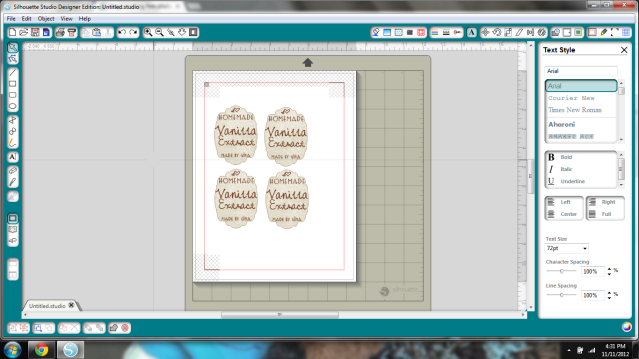
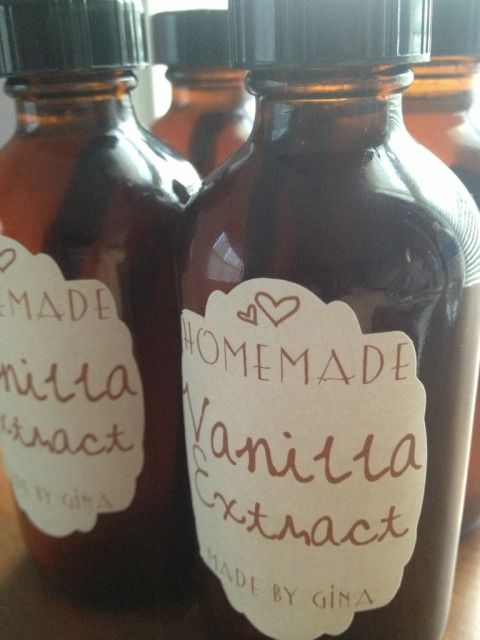
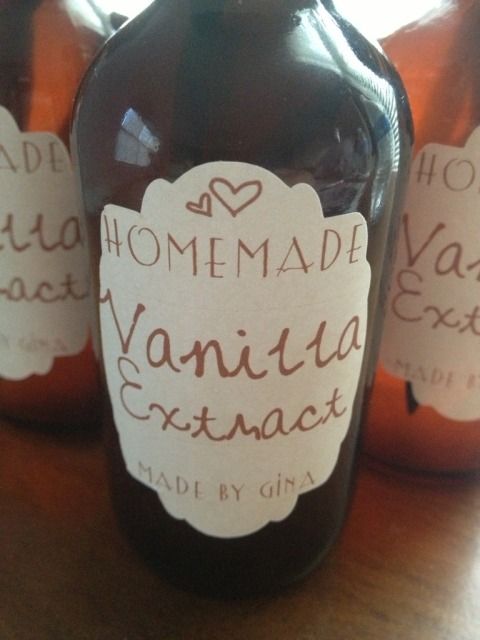
Using the Silhouette Studio Print & Cut feature, I brought up a shape that I thought would be pretty and stretched it so it was more oval shapes.  The background pattern is Autumn Paper Damask.  The text is just brown.  The heart shapes are WingDings from a MTF font called "Heart Doodle." "Vanilla Extract" is typed in MTF Mikayla.   "Homemade" and "Made by Gina" are typed in Lemon Chicken.


Once I liked the label, I kept duplicating it til I had all I needed.  I then resized it based on a quick glace at a wooden ruler on the bottles.  I swear, creativity is half inspiration, half perspiration, half keeping your fingers crossed that you aren't wasting $2 in paper because you can't be arsed to take calibrated measurements with curved tools and markings.  Print, Cameo Cut, & adhere vinyl to bottle...perfection!


The only thing missing now is shrink bands.  I'm not ready to seal it up just yet.  I've been keeping an eye on the color and I'm also considering putting fresh beans in the bottles with a note about topping off with vodka before I give them away.


I swear I can smell fresh-baked chocolate cookies when I look at these.


Notes- I decanted from the stainless steel thermos into these bottles a few weeks ago.  The thermos had 4 beans, one bean/4oz or 1/2 cup.  These are 4oz bottles and each have 1 bean inside now.  Industry standard is 0.8 beans/cup so you can reasonably assume that store vanilla has less than half of a bean in 4oz.  Sounds kinda bland.

10.29.2012

Silhouette Sketch Card Challenge 10.25.2012

I am not sure I've ever entered a contest with my craft stuff (does Girl Scout Camp circa mid-1990s count?) but when I saw the Silhouette Sketch Card Challenge I decided to give it a try.  I wanted to make a card to send to someone doing me a very special favor for my son, so by the time you read this the card will be off to a good home :)

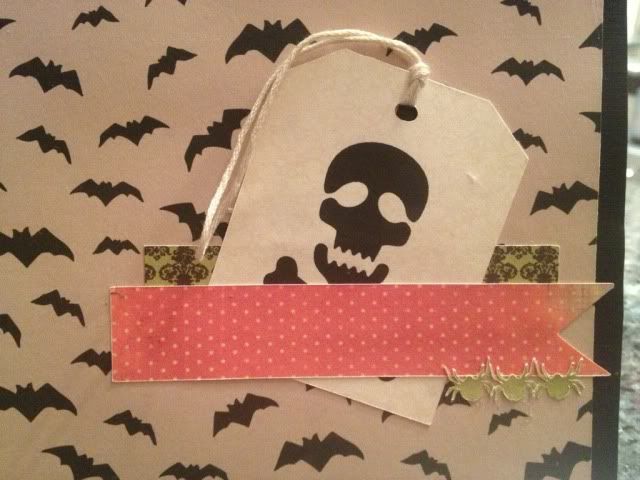
The colors are not photographing well, especially the orange.  See close up below for a better idea!

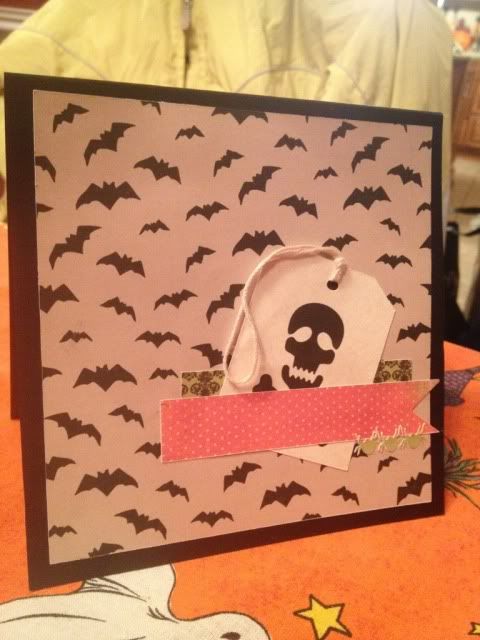
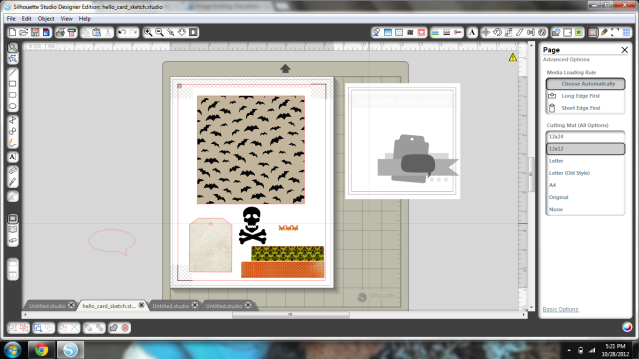
The bats are tan and black.  The damask is dark green and black.  The polka dotted strip is orange and white.  I'd take better pics in natural light, except Frankenstorm Sandy has pretty much guaranteed no sunlight for today.

One thing I love about the Cameo is the Print & Cut feature.  I have never been happy to be limited by cartridges, and while I branched out with 3rd party programs on my Cricut, I still needed things.  With Print & Cut, all I need is 8.5x11" card stock.  You can get a pack of 100 sheets at Michael's for under $4 when you coupon it.  I DID have black card stock and some tan thread laying around from previous crafts, but everything else is all Print and Cut.

Card- black card stock, Michael's
Bat background- Silhouette Store
Tag's Background- Silhouette Store
Green Background (back strip)- Silhouette Store
Orange Background (front strip)- Silhouette Store
Tiny Spiders (ungrouped & multiplied)- Silhouette Store
Skull Shape (ungrouped)- Silhouette Store
Tag Shape- Silhouette Store (I couldn't find this one; I think it was in the freebie start-up download pack)
Tan Thread- Michael's

See?  I only needed to have 3 items on hand (black card stock, white printable card stock, and thread) and I made this adorable embellished card!  I decided to go with a Halloween card because I love this holiday (a massive decorating post is coming up on Halloween itself, but you can look back for the month's posts and see for yourself!) and it seems like every other crafter on the planet has jumped ahead to Christmas, along with every store I go to, and even some Sirius radio stations!  Slow down people, we still have allll of November to decorate for!

On to the card itself!

1 page!


I eliminated the word bubble because I just thought it made the card too busy.  I tried "Happy Halloween," "BOO!" and "SPooKy!" in a creepy Halloween-y font but in the end I think it was just over the top.

The 3 spiders scared me- I was afraid their legs would rip- they're not perfect, but you can't really tell.

I did cut the orange strip so it would have a banner-like edge as the sketch did.  For the Print & Cut I just drew 2 rectangles with the rectangle tool and filled them in.  What really helped also was using "Bring to Front" "Send to Back" etc. to help me line everything up digitally before I separated it again and printed it out.


I love Print & Cut because I did not have to do any special shopping to make this.  I just got inspired by the challenge, opened up Studio, and browsed the store til I had what I needed.  Most of what I used I happen to already have!

Thanks for looking!


10.18.2012

Silhouette Dial Calender

***In a few days I will be doing a giveawy for a FREE Chomas Creations Marker Holder for the Silhouette Cameo- open to followers only & you can earn up to 4 entries!  Your odds here are pretty good- stay tuned!**

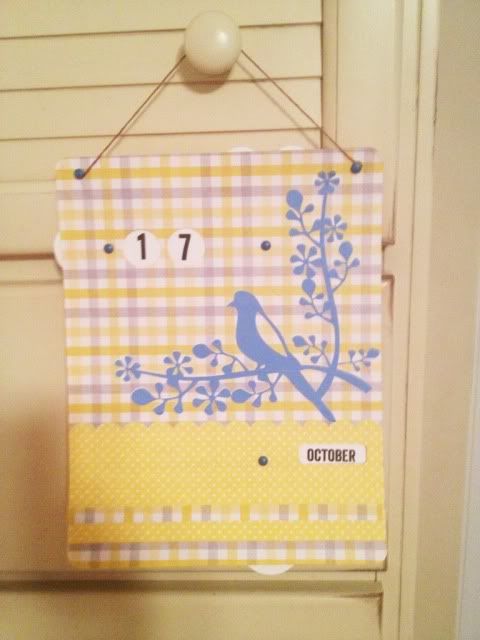
In the Silhouette Store there is a 99 cent dial calender shape.  I bought it when I was browsing the store before my Cameo had even arrived.  It looks boring in the stock photo (sorry, Samantha Walker Designs, it does!) but I had an idea that I could spruce it up.  My original idea was filling the blank space with a sticky note pad and a pen.

Then my Cameo got here and all the blank space looked intimidating in the Studio software, so I left it alone.

A few days ago the dial calender was featured on the Silhouette Blog and I decided to give it a try.  Seeing that blank space filled up actually helped me visualize it better.  I abandoned the idea of adding a note pad and just embellished with a cute 99 cent bird & branch shape.

The yellow papers are all 59 cent card stock from Michael's.  The dials with the numbers and months, as well as the bird & branch shape, were made with Print & Cut onto white card stock.  Steel blue brads and brown twine finish everything off.

I'm glad I gave it a shot.  I like how it came out.


9.30.2012

Print & Cut: New Home Card

One feature of the Cameo that I really like over the Cricut X is the Print & Cut feature.  That lets me just print shapes in my printer and then cut them in the Cameo.  It's so much easier for tiny embellishments; you don't have to buy 6 different colors of card stock for tiny things.  Just print on white & you're good to go!

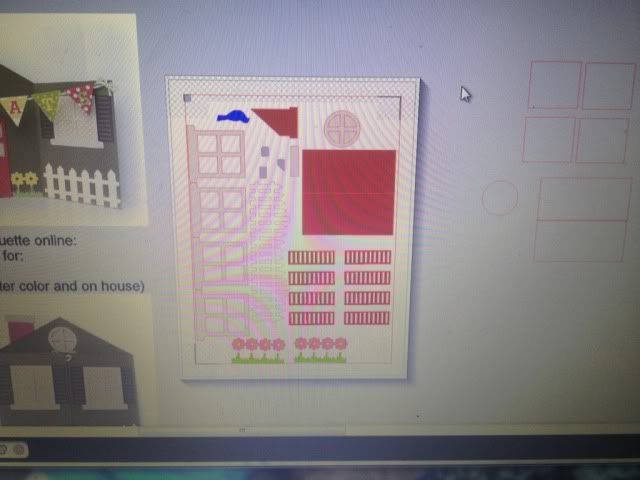
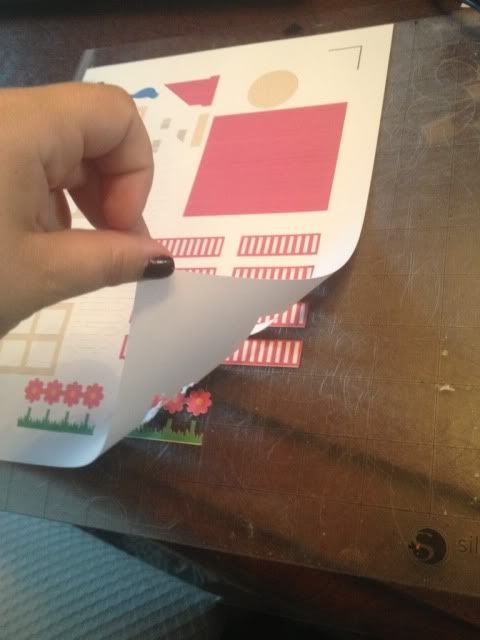
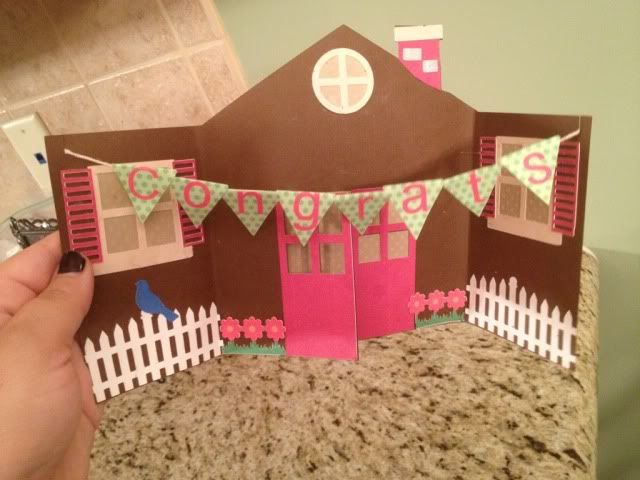
Here are the tiny details on a house card I made for my sister.  I printed it just as you see here.

Cell phone photo of my screen, since I never remember that I can do screenshots.


The Cameo scans the Registration Marks and cuts your design!

The inside of the shutters was cut as well; just had to be poked out.
\

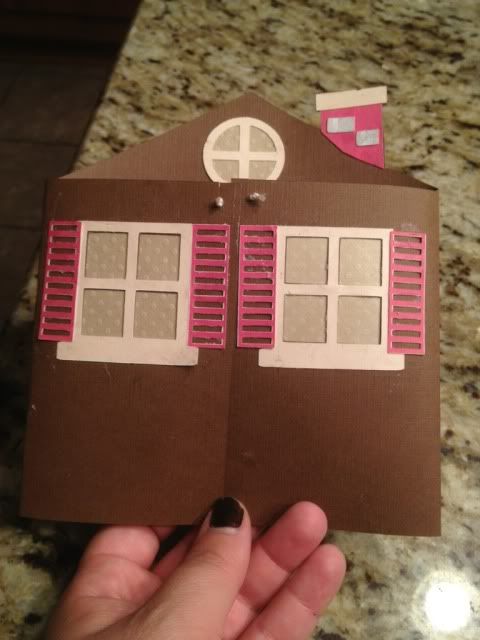
So for this house, the brown house itself was a 12x12 piece of brown card stock that I happened to have but everything else was made with Print & Cut.

Glue not dry.

The guide wanted me to add a brad for the door knob, but I may just glue a jewel on there at some point.


Showing posts with label print and cut. Show all posts

8.22.2013

Cards with print and cut, mod podge, embossing, and more!

I've been having a little fun doing something I don't normally do, which is make cards.  Normally I feel like cards are kind of a waste of paper.  People rarely save them and paper = trees, ya know?

Regardless, I did want to make a few cards recently, and here are the results.

The first one was for my mother in law's birthday.  This card was made with print and cut, my favorite feature of the Silhouette Cameo.  The card itself is pale pink cardstock but everything else is print and cut.  I filled the background shape with the pretty rose pattern, use the color matching dropper tool to pick out pinks from the roses and make a gradient of colors for the cake, and filled in the cake stand and candle parts with solid colors.  Print, cut, glue, voila!


The second card I made is for our awesome, patient, and hard working Realtor.  This card is actually a "Welcome to the Neighborhood" card in the Silhouette store but I just deleted the text and added "Thank you" instead (Font name- Cheri).


Before cutting the letters I ran the paper through my Sizzix Big Shot using a Cuttlebug embossing folder.  I had to bump my blade up from 3 to 5 to cut through the cardstock after that, but I like the delicate detail it gives.

Everything on this card is colored card stock, no print and cut this time!  The hearts have Mod Podge Dimensional Magic  on them which is really fun as it dries clear but hard, smooth, shiny, and raised up.


I'm considering making our holiday cards this year instead of ordering the ever-present Shutterfly photo card, but we'll see if I have the patience for that (especially with a newborn coming soon!).

5.03.2013

Baby banner, and shape cropping with the Silhouette Cameo

I was reading the Silhouette blog for the first time in awhile and noticed that today's posting involved a shape challenge.  You can see it here, along with a link to the shape's download page.  Since I have been trying to make some baby shower decor (so far my tissue balls are more like tissue wheels...) I decided to use this as an opportunity to make a banner to string across the 8' long dessert table at the baby shower.

I think it's pretty obvious that my favorite feature of the Silhouette software is print & cut, since I don't need to have anything on hand but plain white card stock.  I bought the blue & brown pattern in the Silhouette store and filled up the shape's triangle banners.  I then created a circle inside the triangle, turned off the cut lines, and color matched it.  I then used print & cut to make 4 of those.  The letters BABY were cut out of white card stock and adhered with rolled glue dots to give them a little dimension.

Next came my ultrasound photos.  I used the other two shapes from the banner and shape cropped my ultrasound photos.  This is really easy to do.


First lay your photo and then choose the shape you want it.  Drag that shape over to the photo and align it where you want the crop.  It might be hard to see, but that banner shape is over the baby in the ultrasound in the screenshot below.


Next, drag your mouse and highlight/select both the photo and the shape at the same time.

Last, click Modify (top right, looks like a rectangle with a circled M in the upper right corner- see pic below) and then click crop.  Voila!  Easy peasy!  You may have to manually turn the cut lines on the shape when you crop it this way so just go to your cut line window (scissors with red, to the left of the font's A symbol) and click "Cut Edge."


I then created offsets for all 5 of my ultrasound photos and fill color matched them blue and brown to the triangle's pattern (you can see the blue offset for this particular ultrasound in the screenshots above).

Lots of printing & cutting comes next- I love print and cut, have I said that?  All I needed to have on hand for this was 12 sheets of plain white card stock and some string.

I used glue dots on the corners of the ultrasound photos and stuck them to the offsets.  I then used my bar, which is 8' 5" long, marked off 8' exactly, and measured out the string, taping the ends to the bar.  Starting with the center ultrasound photo and working out, I taped the string about 1/2 inch down the back of each banner piece.  For the party, this will be strung across the dessert table, with a white tablecloth behind it and white and blue tissue balls at each end (if I can get that particular craft mastered!).


So cute!  I love personalized decor and thought this was much more fun than a cluster of framed ultrasound photos. 

If you don't like to print, cut, and glue x1000, just make every single banner piece one layer- IE, shape crop your ultrasound, turn off the cut lines, offset it, color it, turn those cut lines on, and print & cut it.  That should print you a photo with a border, basically (the offset) and then cut it.  Ditto on the letters- just turn off the cut lines and group them in the circle of the pennant and print & cut it into one piece.

Thanks for looking!


4.24.2013

Happy spring & a tire swing

I have barely looked at my Cameo since I found out I was pregnant in January.  I've played with the software, dreamed of what I'm going to make for the holidays in our new house, thought about what I can make for the new baby to wear, etc...very little actual crafting however.  That will probably change for my baby shower next month, but for now, I just made this cute little card.

Every shape is in the Silhouette store and the only colored paper I used was the green grass; the rest is all print & cut, even the background.  I needed a birthday card for someone and liked the idea of a white picket fence, but not a house since it wasn't for a housewarming.  I had the string laying around and even though I cut cardstock "rope" I changed my mind and I like the string much better :)

This is my favorite part of owning a Cameo over a Cricut (which I still have..)- I can browse the online store, buy a single shape that I like, mix & match all of my shapes, resize, color, edit, and make a digital template, then print it, cut it, and put it together, without getting up or going to the store!


Shape links:

The card itself is this card's shape minus all embellishments, and then I just made a square the same size as the front half and print & cut it blue

I placed the leaves one by one by first putting small glue dots all over where I wanted the leaves, and then using the Pick Me Up tool, placed them one by one easily & quickly over the glue dots.

The birthday girl liked it so much that she wants me to make her 24 random cards, blank inside, and pay me of course :) Guess I'll be busy on the Cameo after all!

1.21.2013

Happy 3rd Birthday to Vivi!

My good friend Val has a little girl who was born right around Frankie's original due date.  Vivi is the cutest thing ever and when Val asked me to make her some birthday gear I jumped at the chance to play with pink for a change!

Val had already found a picture that she liked, and using some scalloped circle shapes from the Silhouette Store we put this little design together.  Val tweaked it a bit, most noticeably adding the second circle around the "3," and then asked for matching stickers.  Those were really easy as long as I made sure that the only cut lines set were those of the scalloped circle and nothing inside!

Front of shirt

Val wanted a similar design on the back:

I don't know why it looks so oddly off center.  Bump in the shirt maybe?  I swear it's straight!:p

She also asked for matching stickers.  She is going to put them on party hats- how cute is that???  And some extra for people to wear like a normal sticker.  I even sent her some extra large stickers for decorating.  If I had a girl I would stick them on a vase, fill the vase with candy, and some pink flowers...ok, enough dreaming of pink!

I ran into two issues during stickers, and I fixed them both, which is why I'm sharing.

First issue- sticker paper settings on the Cameo are too rough.  So are vinyl settings.  I did not want the blade to cut through the backing paper.  I wanted a kiss cut, which is where the sticker is cut but the backing is intact, like a sheet of stickers.


I finally fixed this problem using the settings:  Blade: 1, Speed: 6, Thickness: 8.


I was so happy to see that fixed, but I then realized that this sticker paper was split in two places down the back, I'm assuming to make it easier to remove stickers?  Well, these stickers were getting mailed to Disney World, not used right away.

Stickers that I repositioned to be around the splits in the backing paper...


My fix was pretty simple.  After printing but before cutting, I put strips of packing tape down the back.


This worked like a charm.  The paper no longer split apart once I weeded the extra sticker paper from around the stickers, and as a bonus it didn't stick to the Cameo mat quite as badly.  My mat is fairly new and still sticky enough that if I'm not careful, it will rip paper when I try to remove it from the surface.

I hope Vivi has a great birthday!!!  I will update with pictures of the party hats and anything else that got the sticker treatment :)


11.15.2012

Print And Cut on Printable Vinyl

This weekend we are hosting a Purple Heart fundraiser.  The purpose of the fund raiser is to donate to troops who are trying to make it home for the holidays and can't afford to do it on their own.

Everyone goes on and on about "lazy" military wives and how we stay at home because our husbands get paid well.  I'm here to tell you, almost every E4 and under who has a family is on WIC.  I am thankful that I never was, but my husband and his ex and children were.  Different branches promote at different rates, but the Air Force is on the slower end, and an Airman can still be an E4 at 27-ish years old, nearly 10 years into their career.  Not every Airman is that rank at that age, but it's common.  And most wives stay at home because moving every 3 years looks bad on a resume.  I myself have been told by a company that they don't hire military spouses for that reason (in writing.  Which got forwarded to the labor commissioner.  Le Sigh).

I'm sorry for the little vent, but our military, especially the guys with less than 15 years in, make peanuts for an incredibly responsible job.  I know Airmen who haven't seen their moms in 2+ years.  Not deployment; just travel costs are high and pay is low.  We are so incredibly fortunate to not live paycheck to paycheck and we see our family as much as we can.

So you can tell this fundraiser is very near and dear to me.

We had these handled mason jars donated and will be doing purple drinks to match the Purple Heart and the cups are to keep when you buy a drink (with drink money going to the fundraiser).  I used printable vinyl, which is my new favorite material to work with because it's 100% waterproof when the ink dries AND stands up to our business' industrial strength dish washer without coming off.  I traced a purple heart logo which was actually tricky.  I had to erase a lot to just get the outline.  I should have clicked "Cut Edge" in the settings, but as usual, I over complicated it!


We have 24 of these and I hope we sell them all!  :)

11.12.2012

Making Vanilla Extract, Day 59

As you saw here, I am making a bunch of homemade vanilla extract as add-on holiday gifts (since I'm giving a lot of bakeware, particularly Pampered Chef stoneware- it's good to have a mother-in-law who is a rep!) and as you saw here, it starts to acquire the vanilla goodness very quickly!

Well, today is Day 59 (ish) of this project.  I started late on September 13th and today is November 12th, and 30 Days Has September and all that, anyway, I didn't want to count off days one by one on a calender soooooo here we are.

A few weeks ago I ordered bottles & shrink bands.  I thought 4oz was a nice size, not dinky like the teeeeny $11 supermarket bottle, but not a giant bottle of basically Vodka, either.  I bought amber bottles as sunlight + extracts = no no according to my research.  I also bought a set of shrink bands, which I had to order in packs of 250, so if any of you out there in blogland want some I'll throw a 45c stamp on an envelope and send them your way.  Just let me know!

http://www.specialtybottle.com/amberbostonroundglassbottle4ozwstdcap.aspx

The shrink wraps are made to fit certain bottles, not one size fits all, but you can find the info here on the ones that I bought.  You stick them around your lid and zap them with your hair dryer to seal your bottle up. Nifty.  And cheap.  Like I said, I have 250!


At this point, all I needed was labels.  Originally, I was looking for printable sticker paper, and I wanted an uncut sheet of it, not broken up into shipping labels or whatever.  This wasn't easy to find and when I did it was $34.99 for 10 sheets at Staples!  No thank you!

On an unrelated note, I've been ordering vinyl like a nutcase for crafting and have been playing with printable vinyl as well.  At $1.96/sheet, it's about 1/3 cheaper for 10 sheets than the sticker paper would have been, I have lots of other projects to use it for, and I don't have to buy 10 sheets if I don't want to.  Plus, when the ink dries, this vinyl is 100% waterproof.  Win.

Using the Silhouette Studio Print & Cut feature, I brought up a shape that I thought would be pretty and stretched it so it was more oval shapes.  The background pattern is Autumn Paper Damask.  The text is just brown.  The heart shapes are WingDings from a MTF font called "Heart Doodle." "Vanilla Extract" is typed in MTF Mikayla.   "Homemade" and "Made by Gina" are typed in Lemon Chicken.


Once I liked the label, I kept duplicating it til I had all I needed.  I then resized it based on a quick glace at a wooden ruler on the bottles.  I swear, creativity is half inspiration, half perspiration, half keeping your fingers crossed that you aren't wasting $2 in paper because you can't be arsed to take calibrated measurements with curved tools and markings.  Print, Cameo Cut, & adhere vinyl to bottle...perfection!


The only thing missing now is shrink bands.  I'm not ready to seal it up just yet.  I've been keeping an eye on the color and I'm also considering putting fresh beans in the bottles with a note about topping off with vodka before I give them away.


I swear I can smell fresh-baked chocolate cookies when I look at these.


Notes- I decanted from the stainless steel thermos into these bottles a few weeks ago.  The thermos had 4 beans, one bean/4oz or 1/2 cup.  These are 4oz bottles and each have 1 bean inside now.  Industry standard is 0.8 beans/cup so you can reasonably assume that store vanilla has less than half of a bean in 4oz.  Sounds kinda bland.
10.29.2012

Silhouette Sketch Card Challenge 10.25.2012

I am not sure I've ever entered a contest with my craft stuff (does Girl Scout Camp circa mid-1990s count?) but when I saw the Silhouette Sketch Card Challenge I decided to give it a try.  I wanted to make a card to send to someone doing me a very special favor for my son, so by the time you read this the card will be off to a good home :)

The colors are not photographing well, especially the orange.  See close up below for a better idea!

The bats are tan and black.  The damask is dark green and black.  The polka dotted strip is orange and white.  I'd take better pics in natural light, except Frankenstorm Sandy has pretty much guaranteed no sunlight for today.

One thing I love about the Cameo is the Print & Cut feature.  I have never been happy to be limited by cartridges, and while I branched out with 3rd party programs on my Cricut, I still needed things.  With Print & Cut, all I need is 8.5x11" card stock.  You can get a pack of 100 sheets at Michael's for under $4 when you coupon it.  I DID have black card stock and some tan thread laying around from previous crafts, but everything else is all Print and Cut.

Card- black card stock, Michael's
Bat background- Silhouette Store
Tag's Background- Silhouette Store
Green Background (back strip)- Silhouette Store
Orange Background (front strip)- Silhouette Store
Tiny Spiders (ungrouped & multiplied)- Silhouette Store
Skull Shape (ungrouped)- Silhouette Store
Tag Shape- Silhouette Store (I couldn't find this one; I think it was in the freebie start-up download pack)
Tan Thread- Michael's

See?  I only needed to have 3 items on hand (black card stock, white printable card stock, and thread) and I made this adorable embellished card!  I decided to go with a Halloween card because I love this holiday (a massive decorating post is coming up on Halloween itself, but you can look back for the month's posts and see for yourself!) and it seems like every other crafter on the planet has jumped ahead to Christmas, along with every store I go to, and even some Sirius radio stations!  Slow down people, we still have allll of November to decorate for!

On to the card itself!

1 page!


I eliminated the word bubble because I just thought it made the card too busy.  I tried "Happy Halloween," "BOO!" and "SPooKy!" in a creepy Halloween-y font but in the end I think it was just over the top.

The 3 spiders scared me- I was afraid their legs would rip- they're not perfect, but you can't really tell.

I did cut the orange strip so it would have a banner-like edge as the sketch did.  For the Print & Cut I just drew 2 rectangles with the rectangle tool and filled them in.  What really helped also was using "Bring to Front" "Send to Back" etc. to help me line everything up digitally before I separated it again and printed it out.


I love Print & Cut because I did not have to do any special shopping to make this.  I just got inspired by the challenge, opened up Studio, and browsed the store til I had what I needed.  Most of what I used I happen to already have!

Thanks for looking!


10.18.2012

Silhouette Dial Calender

***In a few days I will be doing a giveawy for a FREE Chomas Creations Marker Holder for the Silhouette Cameo- open to followers only & you can earn up to 4 entries!  Your odds here are pretty good- stay tuned!**

In the Silhouette Store there is a 99 cent dial calender shape.  I bought it when I was browsing the store before my Cameo had even arrived.  It looks boring in the stock photo (sorry, Samantha Walker Designs, it does!) but I had an idea that I could spruce it up.  My original idea was filling the blank space with a sticky note pad and a pen.

Then my Cameo got here and all the blank space looked intimidating in the Studio software, so I left it alone.

A few days ago the dial calender was featured on the Silhouette Blog and I decided to give it a try.  Seeing that blank space filled up actually helped me visualize it better.  I abandoned the idea of adding a note pad and just embellished with a cute 99 cent bird & branch shape.

The yellow papers are all 59 cent card stock from Michael's.  The dials with the numbers and months, as well as the bird & branch shape, were made with Print & Cut onto white card stock.  Steel blue brads and brown twine finish everything off.

I'm glad I gave it a shot.  I like how it came out.


9.30.2012

Print & Cut: New Home Card

One feature of the Cameo that I really like over the Cricut X is the Print & Cut feature.  That lets me just print shapes in my printer and then cut them in the Cameo.  It's so much easier for tiny embellishments; you don't have to buy 6 different colors of card stock for tiny things.  Just print on white & you're good to go!

Here are the tiny details on a house card I made for my sister.  I printed it just as you see here.

Cell phone photo of my screen, since I never remember that I can do screenshots.


The Cameo scans the Registration Marks and cuts your design!

The inside of the shutters was cut as well; just had to be poked out.
\

So for this house, the brown house itself was a 12x12 piece of brown card stock that I happened to have but everything else was made with Print & Cut.

Glue not dry.

The guide wanted me to add a brad for the door knob, but I may just glue a jewel on there at some point.