Showing posts with label Decor. Show all posts

10.31.2013

Happy Halloween! DIY Decor

Happy Halloween!  Free time has been scarce around here.  I can't believe my little one is almost two months old already!  I love Halloween so did take the time to set up this little decorated desk area in the kitchen.

Most of this is DIY- one painted pumpkin and 8 files from the Silhouette online store!

Top shelf- garland from Michael's.  Pumpkin from Michael's, glittered by me.

Middle shelf- tombstone and spooky tree frame from Silhouette store.  Glass pumpkin from Walmart and filled with a cheap tinsel Halloween garland.  Bat Wing Juice and Poison cartons from Silhouette store.

Bottom shelf- BOO boxes, fruit basket, 3D pumpkins, and paper flowers from Silhouette store.  Birdhouse is from Tuesday Morning.  Terra Cotta pumpkin is from HomeGoods.

Special mention- the weird looking pumpkin thing with green vines in that little nook shelf was made by me in elementary school!  The skull mug in the nook is from the dollar store.


The 3D pumpkins in the fruit crate are probably my favorite, though the Bat Wing and Poison cartons have inspired me to make a whole apothecary shelf for next year- maybe the mantle?  Eyeballs in mason jars and lots of creepy files from the Silhouette store should make it easy!

11.30.2012

3D JOY Display

I am a member of the Silhouette Flickr group and I keep seeing these cute 3D word displays from Needles n Knowledge.  First she did one with the word "Spooky" and then "Thankful."  Her latest is "Joy."  Jodi is very nice and answered several questions I had about her "Thankful" display but I ended up deciding that it was just too long of a word and I felt overwhelmed looking at the cuts.

When I saw her "Joy" display I decided to give that one a try.  Only 3 letters, can't be that bad, right?

All I can say is, Jodi has the patience of a saint.

3D letters are probably my least fun thing to ever assemble.  Especially curved ones like the J and the O.  The Y wasn't too awful.  It's also very time consuming to glue together zig zag edges and wait til they are sturdy enough to glue more zig zag edges, not to mention trying to put pressure on a hollow 3D letter when you are gluing it together...eek!

All 3 letters are from the Sil store (I just searched 3D letters).  I made the J as large as it would fit on a 12x12" page, turning it diagonally to get it even bigger.  The Y was resized to be about 1/2 the J and the box under the Y was meant to be the other half of the J, size-wise, but it came up a little short so I used corrugated cardboard to quickly make a sweater box (maybe?) so it looks like a stack of presents and balances out the J.  The O was sized to match the top half of the Y.

After those were cut, I used the Silhouette Knife Tool to slice all the tabs and stuff off of the letters so I just had a flat J and Y (I don't need the O for this part).  I used the line tool to fill in any missing lines, pattern filled them with the argyle (J) and holly/berry pattern (Y) and used the Print & Cut feature.  I then glued these to the front of the J and the Y.

For the O, I downloaded  a wreath in the Silhouette Store and cut every layer out of print and cut in different shades of green with one layer being a pattern that had berries.  The bow was color filled in red and print & cut at the same time.  I like to stick as much on a sheet as I can when I do print & cut!  I also downloaded a 3D Star, color filled it yellow, and,  you guessed it, print & cut!

The bow and the tree pieces were cut out of green paper (different papers) and the box was cut at the same time I cut the Y, since they both fit on a 12x12 paper.  In fact, the box is from the "BOO" display I made in October!  I just erased the B and voila, plain box.  The base of the tree I filled with a wood pattern and again utilized the print & cut feature.

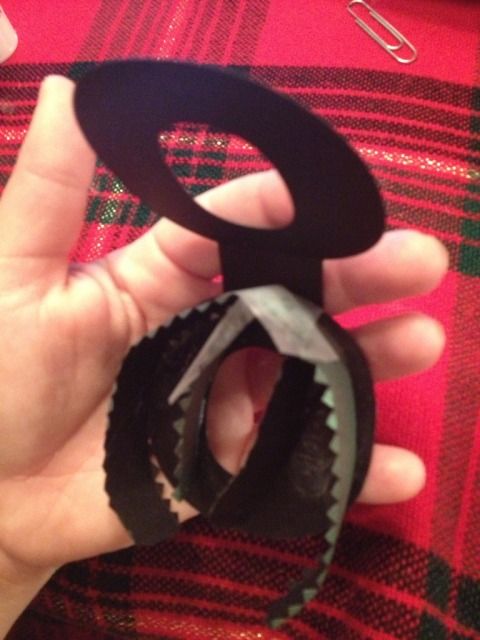
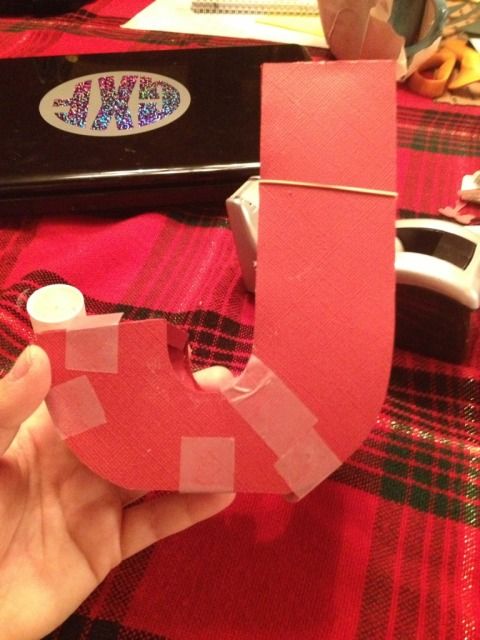
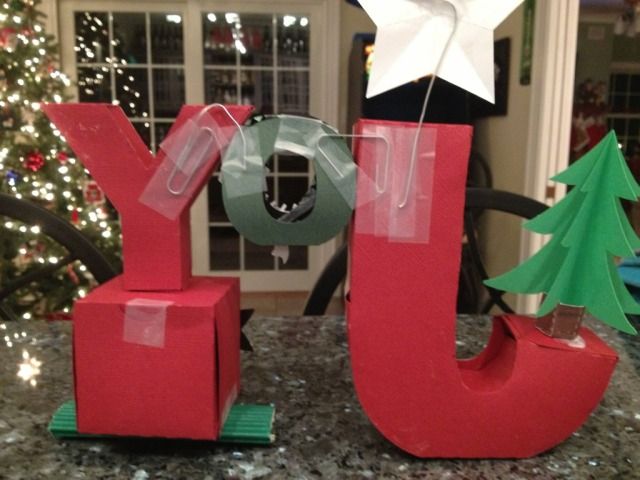
So...everything is cut.  I already mentioned what a pain in the butt it is to put together these letters.  Here's some in-process photos.  Yes, I gave up and started trying to discretely use tape.


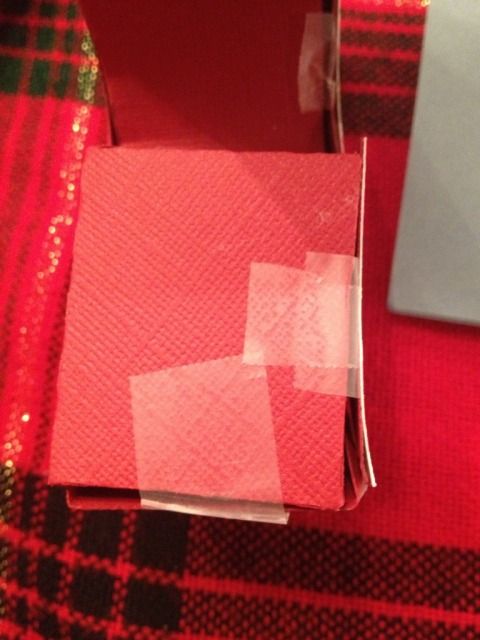
The most noticeable pieces of tape were going to be on the end of the J where the tree rests.  The tree just wouldn't hide it that well. 


I cut a square of that same red paper and used spray glue because at that point I was hating my glue stick.


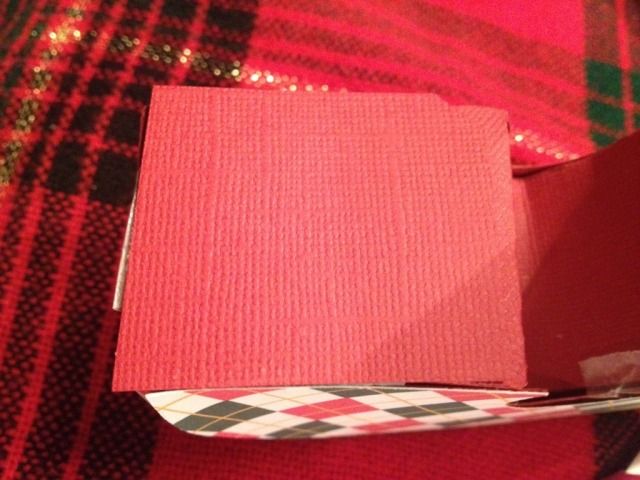
Not perfect, but this is the angle that looks the worst.

Now I had to figure out how to get the letters stuck together.  Glue was an obvious choice, except you can't put pressure on hollow paper letters.  Both sides of the O had to stick to the J and the Y and it just didn't seem like it would work.

I came up with an idea, and it works very nicely, but it looks completely awful from the back.


Yep.  Paperclips.  Also, I see the glue on the tree isn't dry yet, which reminds me, I totally found that liquid white school glue works VERY nicely when you can't put pressure on something, but it doesn't dry all that fast which can be a problem.

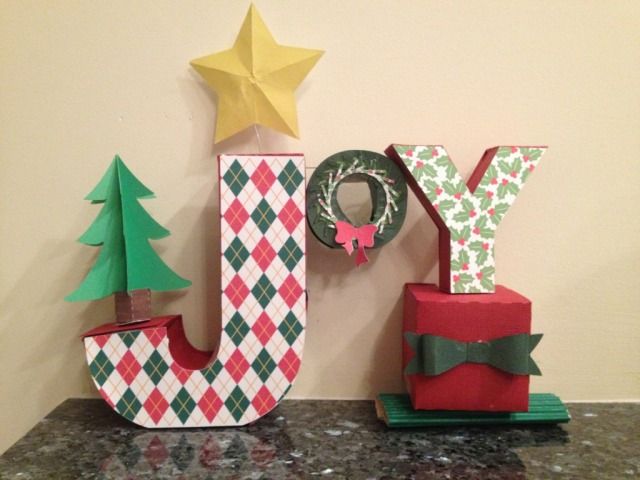
So, about 3.5 hours later, 2 pieces of green paper, 2 pieces of red paper, 1 piece of printable card stock, and some corrugated green cardboard later, we have....


Is it perfect?  No.  Is it real?  100%.  I'm not paid by Silhouette, endorsed by Needles n Knowledge, on any design teams, or anything like that.  I'm just a mom who really, really likes Print & Cut because I never have card stock on hand.  

I may tweak some things, including more branches on the wreath, making the corrugated card board look nicer, and some other minor changes, but on the other hand, I'm kind of done with this sucker now.  

I recommend finding wooden or even the paper mache type letters at craft stores, assuming they have sizing that you like, and decorating those with Silhouette designs.  They will be sturdier and therefore last longer (hopefully) and you won't have to worry about assembling them.

Also, I am looking for recommendations on glue if you make lots of 3D crafts like this!  I have Scotch Crafter's Glue Stick and some 3M Spray Glue, but maybe some of my assembly problems are bad glue choices?  What do you think?


11.14.2012

DIY Harvest Banner with the Silhouette Cameo (Pic heavy!!!)

I have seen lots of fall decor around lately.  I've even seen files to buy all or parts of a banner both in the Silhouette Online Store & for sale around the net by various file makers.

The thing is, I like being creative.  I wish I could freehand draw in Silhouette Studio; that would make it perfect.  I *almost* bought a set of files on the Sil Store for a banner, but each letter in "Harvest" was a different 99c download, and I couldn't find the file for the H!  So, DIY it was!  I managed to make this ALL with shapes I already owned.

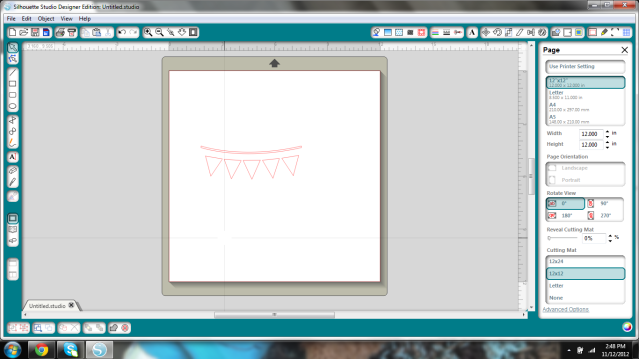
I started with this shape.  I used it to make a tiny print & cut banner that I made to go with a scarecrow in a plant.


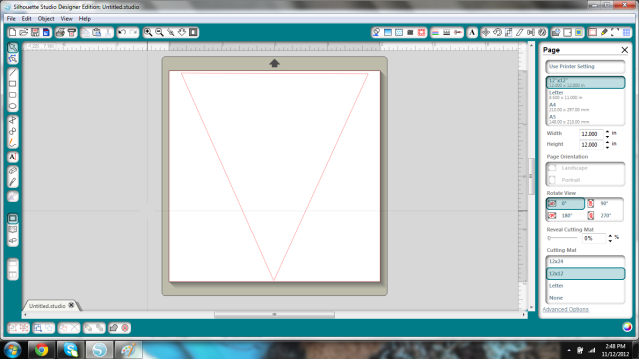
I deleted the rope shape and all of the triangles except for the middle one.

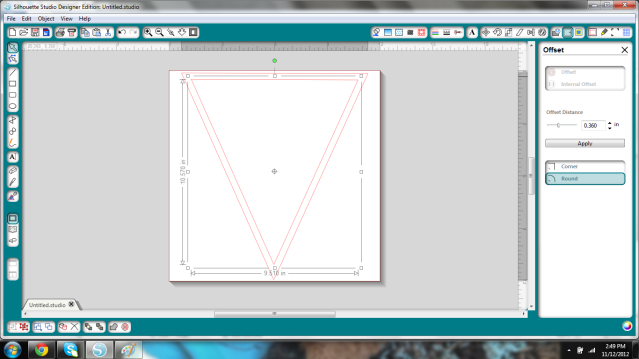
I wanted it to be a large banner so I stretched this as large as would fit on the 12x12" mat.


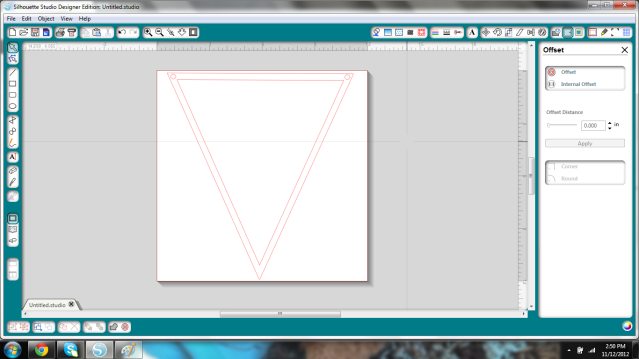
I then created an Internal Offset and increased the offset distance until I liked how it looked.


Next I added two small circles (I made one and duplicated it so they'd be the same, actually) to string my banner up.  Twine in mind at this point.


Now- remove your inner pieces, and group the holes & outer triangle.  Save it, as you'll need to cut it for each letter.  I'll need 7 for Harvest.  Set it aside; you don't need it any more.

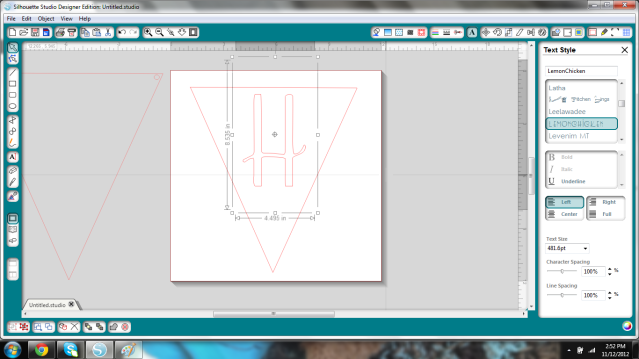
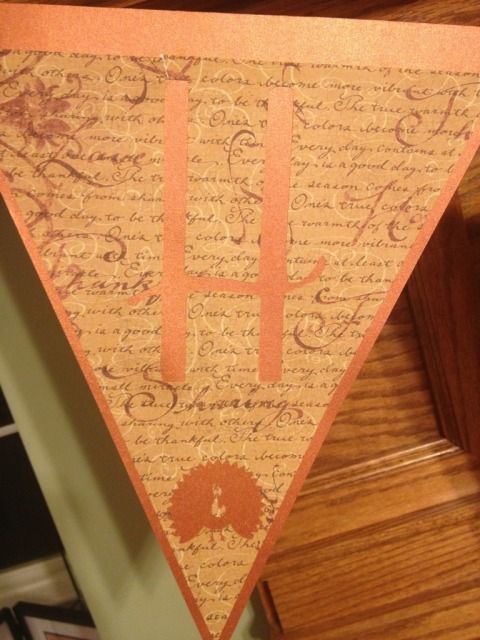
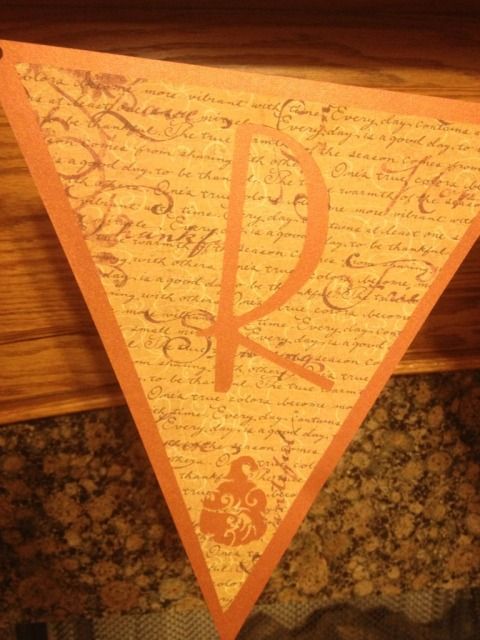
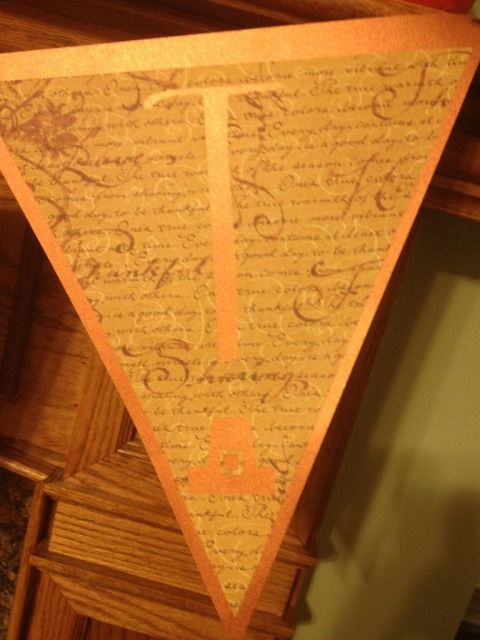
Take your inner (the Internal offset) piece, type your first letter, find your font, resize, and stick an image you like on the bottom (if you want).  I had a group of leaves, a pumpkin card, a gourd-type sketch, a turkey, and I took the hat from the Scarecrow shape which I stretched taller and added 2 squares for a buckle- instant pilgrim hat!


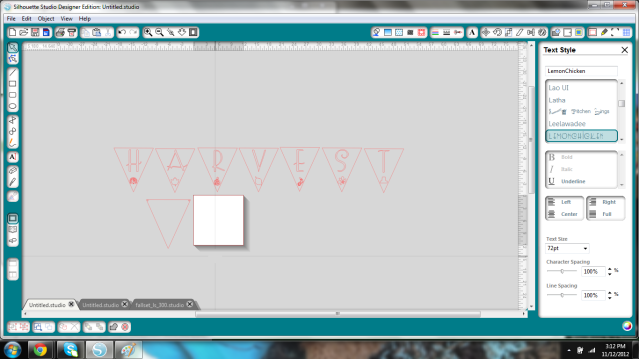
I just kept duplicating the Internal Offset triangle and resizing shapes that I thought would look good, and when done, I lined them all up and zoomed out so I could get a look at it.  I didn't duplicate the outer triangle 6x because I just used my imagination.


It's kind of hard to see from that pic but I was just getting a general idea of how it would look in case I needed to tweak it.

I then went to Michael's, since I have a library of vinyl but no cardstock, and just kind of visualized it with the current fall decor on the mantle.  This orange background flag is GORGEOUS.  I wish I could photograph it or describe it accurately.  It's a deep orange, but iridescent, almost like a good expensive fabric that shimmers and takes on a life of it's own when you move.  Anyway, total for 14 sheets of paper was $8.86.

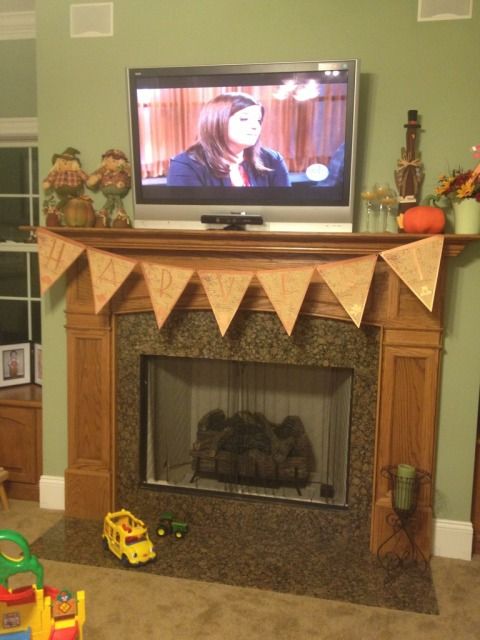
Cut, glue, string, & reveal!

My house has toys on the floor.  I have a toddler.  Also, I love the food network. 

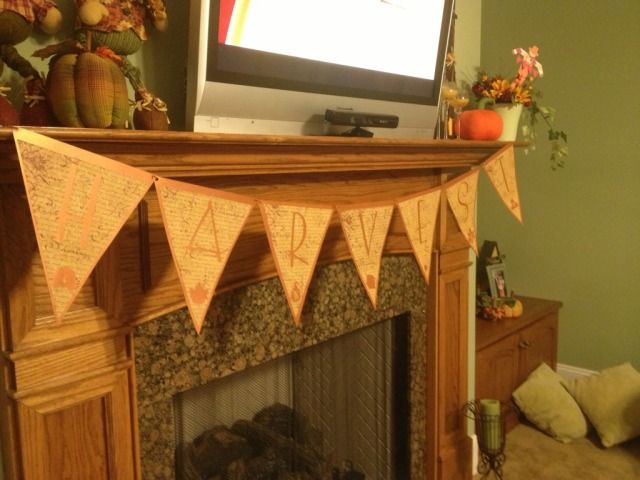
I used brown string that I got at Michael's in a 3-pack of brown shades for about $2.  I strung it so that the string was behind the triangles from hole to hole rather than in front.  Oh, and the length?  I taped it to one end of the mantle, strung the flags on, and hoped like heck that the flags weren't going to be too long.  I then pulled it up, taped the other end, and slid the letters back and forth until I liked the spacing.

I have to say, I really like how it came out!


I used 3M Spray Adhesive.  I actually really dislike working with glue.  I find spray adhesive the easiest to use, although I have to keep washing my hands, but it does give it a nice and fast even coat.  It's not completely tacky for the first minute or so, making it re-position-able (at first).  Little pieces, like the turkey face, hat buckle, or inner letter pieces I used a glue stick.


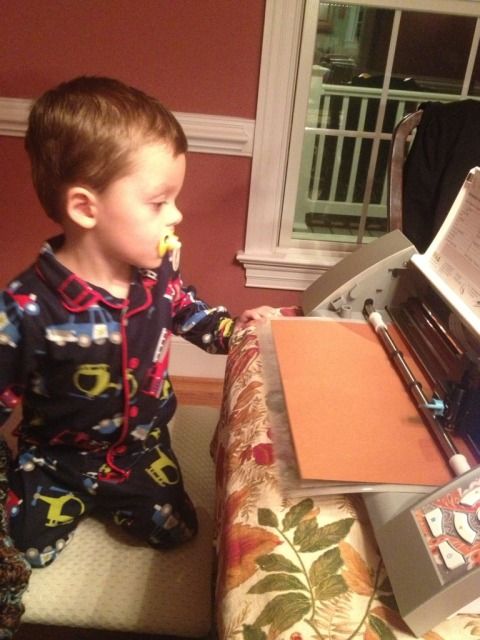
I had a "handy helper" (Oh, Mickey Mouse Clubhouse, how you've implanted into our brains after nearly 3 years) for most of this too!


10.20.2012

Framed Transportation Room Decor- free cutting file!

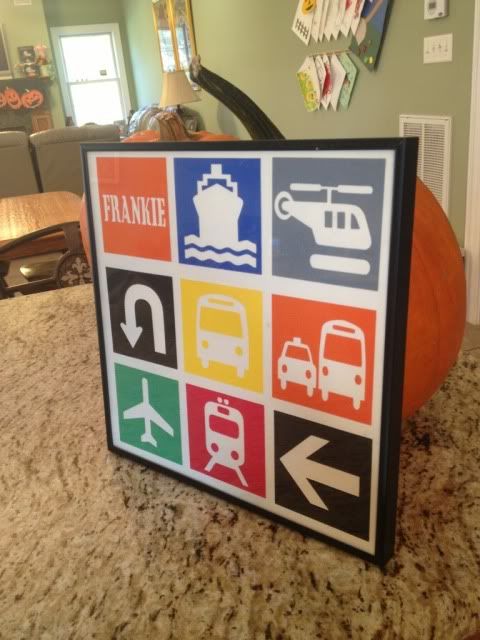
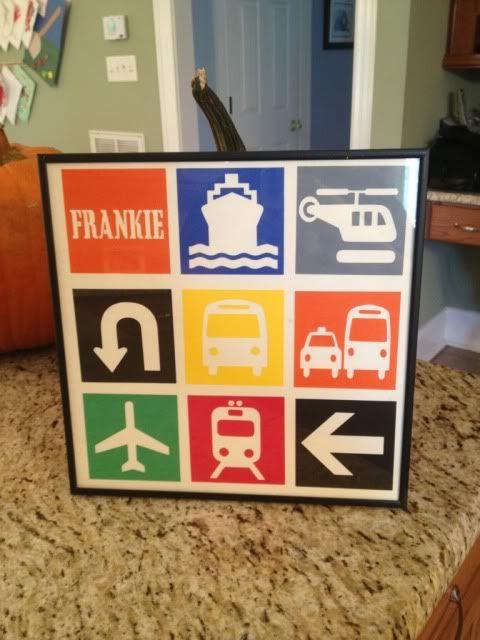
I saw the cutest framed vinyl 12x12 project the other day.  All I saw was a photo.  I poked around and decided it would be easier to just re-create it myself using card stock instead of vinyl.  My son's room is ALL cars...mostly the Disney movie, but cars in general are his thing right now, and we had a blank spot on the wall that this is perfect for!


The first thing I had to do was get supplies.

Frame- 12x12 scrapbook frame at Michaels
Package of colored card stock
1 piece of white card stock (wasn't in the colored package)
1 piece of card stock with a grid pattern- not really necessary but you'll see that I used it to help line everything up.

Total (with two coupons):  $9.09 tax included, and I have about 75 pieces of 12x12 card stock left over

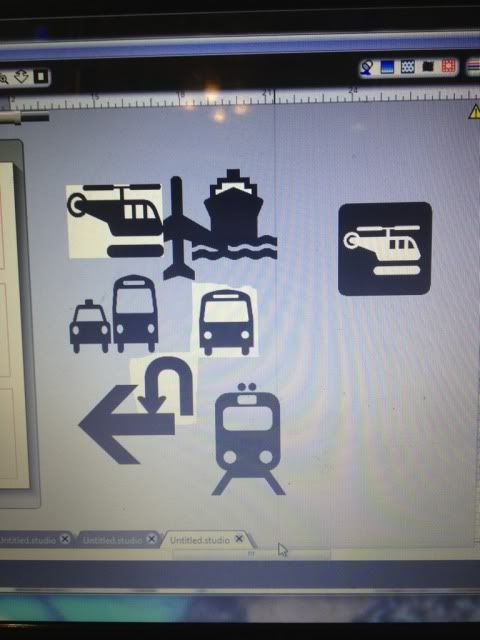
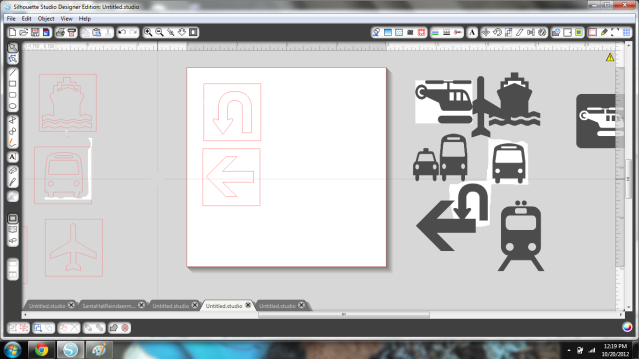
So first, I had to find all the images.  Lots of google helped here.  I saved them all and then traced them in Silhouette Studio.

Untraced images

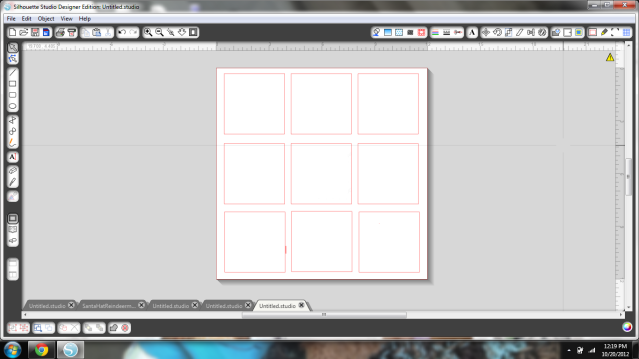
Next came the grid.  I wanted this to fill most of a 12x12, evenly spaced.  I wanted the squares to be actual squares also.  I drew one, resized it, and duplicated it til everything was lined up.


Next I cut this blank grid out to help with spacing.  I used my paper that had a grid just to give me a little more help.  I paperclipped this guide to the white cardstock that I'd be gluing on to.

Not at the gluing step yet, but showing the grid!

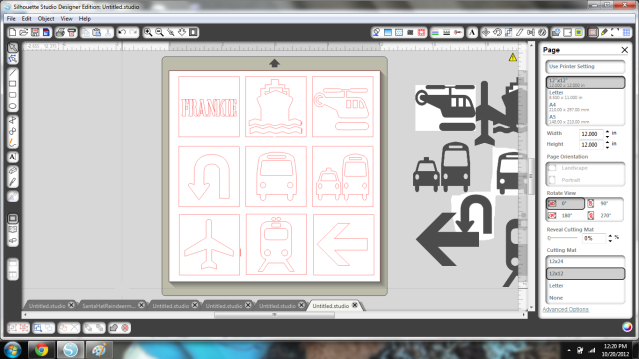
So now I took all of those images that I traced and resized each to fit inside the grid.  My son's name is a font called Cargo Crate.


I liked how it looked.  Now I separated them into what would be colored what- in this case, both arrows are black, so I just kept those two on to cut on black cardstock.  Then the oranges, red, yellow, green, blue, & grey.  One by one, moving things on and off the cutting area.


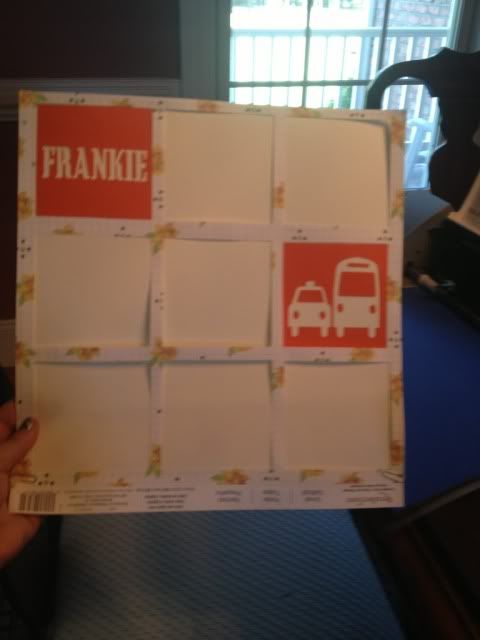
Everything gets glued inside the grid (look up 3 pictures if you've forgotten).  Since I used the outer area and not the shape itself that was cut (I don't know if there are proper terms here), I stuck all the shapes in an envelope for another day.  After everything was placed I unclipped the grid and let it sit to dry for a few minutes.


Want to make one yourself?  You're in luck, because I'm sharing the file for free right here!  Also, go here if you need to download the blank grid (maybe fill it with tiaras and flowers instead of vehicles, for a girl?).  All you need is a free font called Cargo Crate to fill in the name square and the proper materials for actually cutting & framing. I hope you enjoy it and if you use it to make something, please come share a pic! :)

Also, that giveaway for a free Chomas Creations Marker Holder is coming soon- open to blog followers (and you're chances are pretty high!), so stay tuned!

10.04.2012

Baby Room- Themed Name Decor

Having a baby's name above their crib is a pretty popular decorating trend right now.

Here's a very luxurious-looking vinyl monogram & name:


Or some adorable vinyl letters & characters:


I even found a name banner hanging on a crib, which photographs beautifully but is very, very unsafe for baby, as is any sort of long cord/streamer:


What really caught my eye came right from my own family!   My cousin just had a baby boy over the weekend and she posted this photo of his name in his nautical-themed room.  Since my son's room is pirate-themed, I'm picturing this with a few additions like a ship steering wheel & maybe some little pirate hats??  As long as baby can't reach it, obviously!


I just love the fishing net.  It's very original and works so well with the nautical theme, yet it's practical to hang the letters and shapes on to.


Showing posts with label Decor. Show all posts

10.31.2013

Happy Halloween! DIY Decor

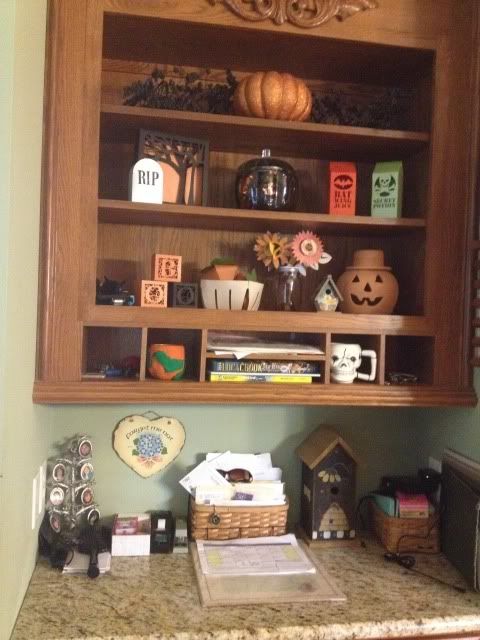
Happy Halloween!  Free time has been scarce around here.  I can't believe my little one is almost two months old already!  I love Halloween so did take the time to set up this little decorated desk area in the kitchen.

Most of this is DIY- one painted pumpkin and 8 files from the Silhouette online store!

Top shelf- garland from Michael's.  Pumpkin from Michael's, glittered by me.

Middle shelf- tombstone and spooky tree frame from Silhouette store.  Glass pumpkin from Walmart and filled with a cheap tinsel Halloween garland.  Bat Wing Juice and Poison cartons from Silhouette store.

Bottom shelf- BOO boxes, fruit basket, 3D pumpkins, and paper flowers from Silhouette store.  Birdhouse is from Tuesday Morning.  Terra Cotta pumpkin is from HomeGoods.

Special mention- the weird looking pumpkin thing with green vines in that little nook shelf was made by me in elementary school!  The skull mug in the nook is from the dollar store.


The 3D pumpkins in the fruit crate are probably my favorite, though the Bat Wing and Poison cartons have inspired me to make a whole apothecary shelf for next year- maybe the mantle?  Eyeballs in mason jars and lots of creepy files from the Silhouette store should make it easy!

11.30.2012

3D JOY Display

I am a member of the Silhouette Flickr group and I keep seeing these cute 3D word displays from Needles n Knowledge.  First she did one with the word "Spooky" and then "Thankful."  Her latest is "Joy."  Jodi is very nice and answered several questions I had about her "Thankful" display but I ended up deciding that it was just too long of a word and I felt overwhelmed looking at the cuts.

When I saw her "Joy" display I decided to give that one a try.  Only 3 letters, can't be that bad, right?

All I can say is, Jodi has the patience of a saint.

3D letters are probably my least fun thing to ever assemble.  Especially curved ones like the J and the O.  The Y wasn't too awful.  It's also very time consuming to glue together zig zag edges and wait til they are sturdy enough to glue more zig zag edges, not to mention trying to put pressure on a hollow 3D letter when you are gluing it together...eek!

All 3 letters are from the Sil store (I just searched 3D letters).  I made the J as large as it would fit on a 12x12" page, turning it diagonally to get it even bigger.  The Y was resized to be about 1/2 the J and the box under the Y was meant to be the other half of the J, size-wise, but it came up a little short so I used corrugated cardboard to quickly make a sweater box (maybe?) so it looks like a stack of presents and balances out the J.  The O was sized to match the top half of the Y.

After those were cut, I used the Silhouette Knife Tool to slice all the tabs and stuff off of the letters so I just had a flat J and Y (I don't need the O for this part).  I used the line tool to fill in any missing lines, pattern filled them with the argyle (J) and holly/berry pattern (Y) and used the Print & Cut feature.  I then glued these to the front of the J and the Y.

For the O, I downloaded  a wreath in the Silhouette Store and cut every layer out of print and cut in different shades of green with one layer being a pattern that had berries.  The bow was color filled in red and print & cut at the same time.  I like to stick as much on a sheet as I can when I do print & cut!  I also downloaded a 3D Star, color filled it yellow, and,  you guessed it, print & cut!

The bow and the tree pieces were cut out of green paper (different papers) and the box was cut at the same time I cut the Y, since they both fit on a 12x12 paper.  In fact, the box is from the "BOO" display I made in October!  I just erased the B and voila, plain box.  The base of the tree I filled with a wood pattern and again utilized the print & cut feature.

So...everything is cut.  I already mentioned what a pain in the butt it is to put together these letters.  Here's some in-process photos.  Yes, I gave up and started trying to discretely use tape.


The most noticeable pieces of tape were going to be on the end of the J where the tree rests.  The tree just wouldn't hide it that well. 


I cut a square of that same red paper and used spray glue because at that point I was hating my glue stick.


Not perfect, but this is the angle that looks the worst.

Now I had to figure out how to get the letters stuck together.  Glue was an obvious choice, except you can't put pressure on hollow paper letters.  Both sides of the O had to stick to the J and the Y and it just didn't seem like it would work.

I came up with an idea, and it works very nicely, but it looks completely awful from the back.


Yep.  Paperclips.  Also, I see the glue on the tree isn't dry yet, which reminds me, I totally found that liquid white school glue works VERY nicely when you can't put pressure on something, but it doesn't dry all that fast which can be a problem.

So, about 3.5 hours later, 2 pieces of green paper, 2 pieces of red paper, 1 piece of printable card stock, and some corrugated green cardboard later, we have....


Is it perfect?  No.  Is it real?  100%.  I'm not paid by Silhouette, endorsed by Needles n Knowledge, on any design teams, or anything like that.  I'm just a mom who really, really likes Print & Cut because I never have card stock on hand.  

I may tweak some things, including more branches on the wreath, making the corrugated card board look nicer, and some other minor changes, but on the other hand, I'm kind of done with this sucker now.  

I recommend finding wooden or even the paper mache type letters at craft stores, assuming they have sizing that you like, and decorating those with Silhouette designs.  They will be sturdier and therefore last longer (hopefully) and you won't have to worry about assembling them.

Also, I am looking for recommendations on glue if you make lots of 3D crafts like this!  I have Scotch Crafter's Glue Stick and some 3M Spray Glue, but maybe some of my assembly problems are bad glue choices?  What do you think?


11.14.2012

DIY Harvest Banner with the Silhouette Cameo (Pic heavy!!!)

I have seen lots of fall decor around lately.  I've even seen files to buy all or parts of a banner both in the Silhouette Online Store & for sale around the net by various file makers.

The thing is, I like being creative.  I wish I could freehand draw in Silhouette Studio; that would make it perfect.  I *almost* bought a set of files on the Sil Store for a banner, but each letter in "Harvest" was a different 99c download, and I couldn't find the file for the H!  So, DIY it was!  I managed to make this ALL with shapes I already owned.

I started with this shape.  I used it to make a tiny print & cut banner that I made to go with a scarecrow in a plant.


I deleted the rope shape and all of the triangles except for the middle one.

I wanted it to be a large banner so I stretched this as large as would fit on the 12x12" mat.


I then created an Internal Offset and increased the offset distance until I liked how it looked.


Next I added two small circles (I made one and duplicated it so they'd be the same, actually) to string my banner up.  Twine in mind at this point.


Now- remove your inner pieces, and group the holes & outer triangle.  Save it, as you'll need to cut it for each letter.  I'll need 7 for Harvest.  Set it aside; you don't need it any more.

Take your inner (the Internal offset) piece, type your first letter, find your font, resize, and stick an image you like on the bottom (if you want).  I had a group of leaves, a pumpkin card, a gourd-type sketch, a turkey, and I took the hat from the Scarecrow shape which I stretched taller and added 2 squares for a buckle- instant pilgrim hat!


I just kept duplicating the Internal Offset triangle and resizing shapes that I thought would look good, and when done, I lined them all up and zoomed out so I could get a look at it.  I didn't duplicate the outer triangle 6x because I just used my imagination.


It's kind of hard to see from that pic but I was just getting a general idea of how it would look in case I needed to tweak it.

I then went to Michael's, since I have a library of vinyl but no cardstock, and just kind of visualized it with the current fall decor on the mantle.  This orange background flag is GORGEOUS.  I wish I could photograph it or describe it accurately.  It's a deep orange, but iridescent, almost like a good expensive fabric that shimmers and takes on a life of it's own when you move.  Anyway, total for 14 sheets of paper was $8.86.

Cut, glue, string, & reveal!

My house has toys on the floor.  I have a toddler.  Also, I love the food network. 

I used brown string that I got at Michael's in a 3-pack of brown shades for about $2.  I strung it so that the string was behind the triangles from hole to hole rather than in front.  Oh, and the length?  I taped it to one end of the mantle, strung the flags on, and hoped like heck that the flags weren't going to be too long.  I then pulled it up, taped the other end, and slid the letters back and forth until I liked the spacing.

I have to say, I really like how it came out!


I used 3M Spray Adhesive.  I actually really dislike working with glue.  I find spray adhesive the easiest to use, although I have to keep washing my hands, but it does give it a nice and fast even coat.  It's not completely tacky for the first minute or so, making it re-position-able (at first).  Little pieces, like the turkey face, hat buckle, or inner letter pieces I used a glue stick.


I had a "handy helper" (Oh, Mickey Mouse Clubhouse, how you've implanted into our brains after nearly 3 years) for most of this too!


10.20.2012

Framed Transportation Room Decor- free cutting file!

I saw the cutest framed vinyl 12x12 project the other day.  All I saw was a photo.  I poked around and decided it would be easier to just re-create it myself using card stock instead of vinyl.  My son's room is ALL cars...mostly the Disney movie, but cars in general are his thing right now, and we had a blank spot on the wall that this is perfect for!


The first thing I had to do was get supplies.

Frame- 12x12 scrapbook frame at Michaels
Package of colored card stock
1 piece of white card stock (wasn't in the colored package)
1 piece of card stock with a grid pattern- not really necessary but you'll see that I used it to help line everything up.

Total (with two coupons):  $9.09 tax included, and I have about 75 pieces of 12x12 card stock left over

So first, I had to find all the images.  Lots of google helped here.  I saved them all and then traced them in Silhouette Studio.

Untraced images

Next came the grid.  I wanted this to fill most of a 12x12, evenly spaced.  I wanted the squares to be actual squares also.  I drew one, resized it, and duplicated it til everything was lined up.


Next I cut this blank grid out to help with spacing.  I used my paper that had a grid just to give me a little more help.  I paperclipped this guide to the white cardstock that I'd be gluing on to.

Not at the gluing step yet, but showing the grid!

So now I took all of those images that I traced and resized each to fit inside the grid.  My son's name is a font called Cargo Crate.


I liked how it looked.  Now I separated them into what would be colored what- in this case, both arrows are black, so I just kept those two on to cut on black cardstock.  Then the oranges, red, yellow, green, blue, & grey.  One by one, moving things on and off the cutting area.


Everything gets glued inside the grid (look up 3 pictures if you've forgotten).  Since I used the outer area and not the shape itself that was cut (I don't know if there are proper terms here), I stuck all the shapes in an envelope for another day.  After everything was placed I unclipped the grid and let it sit to dry for a few minutes.


Want to make one yourself?  You're in luck, because I'm sharing the file for free right here!  Also, go here if you need to download the blank grid (maybe fill it with tiaras and flowers instead of vehicles, for a girl?).  All you need is a free font called Cargo Crate to fill in the name square and the proper materials for actually cutting & framing. I hope you enjoy it and if you use it to make something, please come share a pic! :)

Also, that giveaway for a free Chomas Creations Marker Holder is coming soon- open to blog followers (and you're chances are pretty high!), so stay tuned!

10.04.2012

Baby Room- Themed Name Decor

Having a baby's name above their crib is a pretty popular decorating trend right now.

Here's a very luxurious-looking vinyl monogram & name:


Or some adorable vinyl letters & characters:


I even found a name banner hanging on a crib, which photographs beautifully but is very, very unsafe for baby, as is any sort of long cord/streamer:


What really caught my eye came right from my own family!   My cousin just had a baby boy over the weekend and she posted this photo of his name in his nautical-themed room.  Since my son's room is pirate-themed, I'm picturing this with a few additions like a ship steering wheel & maybe some little pirate hats??  As long as baby can't reach it, obviously!


I just love the fishing net.  It's very original and works so well with the nautical theme, yet it's practical to hang the letters and shapes on to.